Self-Hosting n8n: 5 Real-World Options (and Which One I’d Pick)
Here’s what most people miss... “Self-hosting n8n” isn’t one thing. It’s a whole menu of tradeoffs: cost vs. convenience, control vs. maintenance, and “this works on my laptop” vs. “this won’t wake me up at 2 a.m.”
If you’re even thinking about automating more than a couple of zaps, it’s worth understanding your self-hosting options—because n8n’s Community Edition gives you a lot for free (unlimited workflows, executions, and users) as long as you run it yourself. That’s the deal. You bring the server, n8n brings the automation superpowers.
The real problem: n8n Cloud convenience vs. self-host freedom
n8n Cloud is legit convenient. You pay (starts around $20–$24/month) and you don’t think about servers, updates, or Docker. But you’re also opting into usage-based limits and a hosted environment. With self-hosting the Community Edition, you can run unlimited workflows/steps/executions/users on your own infrastructure under n8n’s Fair Code license. That’s a big deal if you’re scaling automations or you just hate getting billed for being successful.
Look, I’ll be honest... if you’re running anything sensitive (customer data, internal ops, regulated stuff) or you expect volume, self-hosting is often the “grown-up” choice. You get data control, can add custom/community nodes, and you avoid vendor lock-in. The tradeoff is simple: you’re now the person responsible for keeping the lights on.
Sources: n8n Community Edition/self-host overview and limits vs Cloud pricing discussed in n8n materials and community docs. See n8n docs and pricing references. n8n Hosting Docs [6], n8n Pricing [2].
5 self-hosting approaches (what they are, who they’re for, and the gotchas)
Here’s the breakdown I wish someone handed me the first time I hosted automation tooling.
1) Local machine (Docker or npm) — best for testing
This is the “try it in 10 minutes” option: run n8n on your laptop/desktop with Docker (or npm). Great for building workflows, experimenting with triggers, and seeing if n8n fits your brain.
- Pros: $0 cost, fast setup, perfect for dev/testing.
- Cons: Your automations stop when your computer sleeps. Also not production-grade.
- Best for: tinkering, proof-of-concepts, learning n8n.
Source: n8n docs include local/Docker guidance. Docker install docs [6].
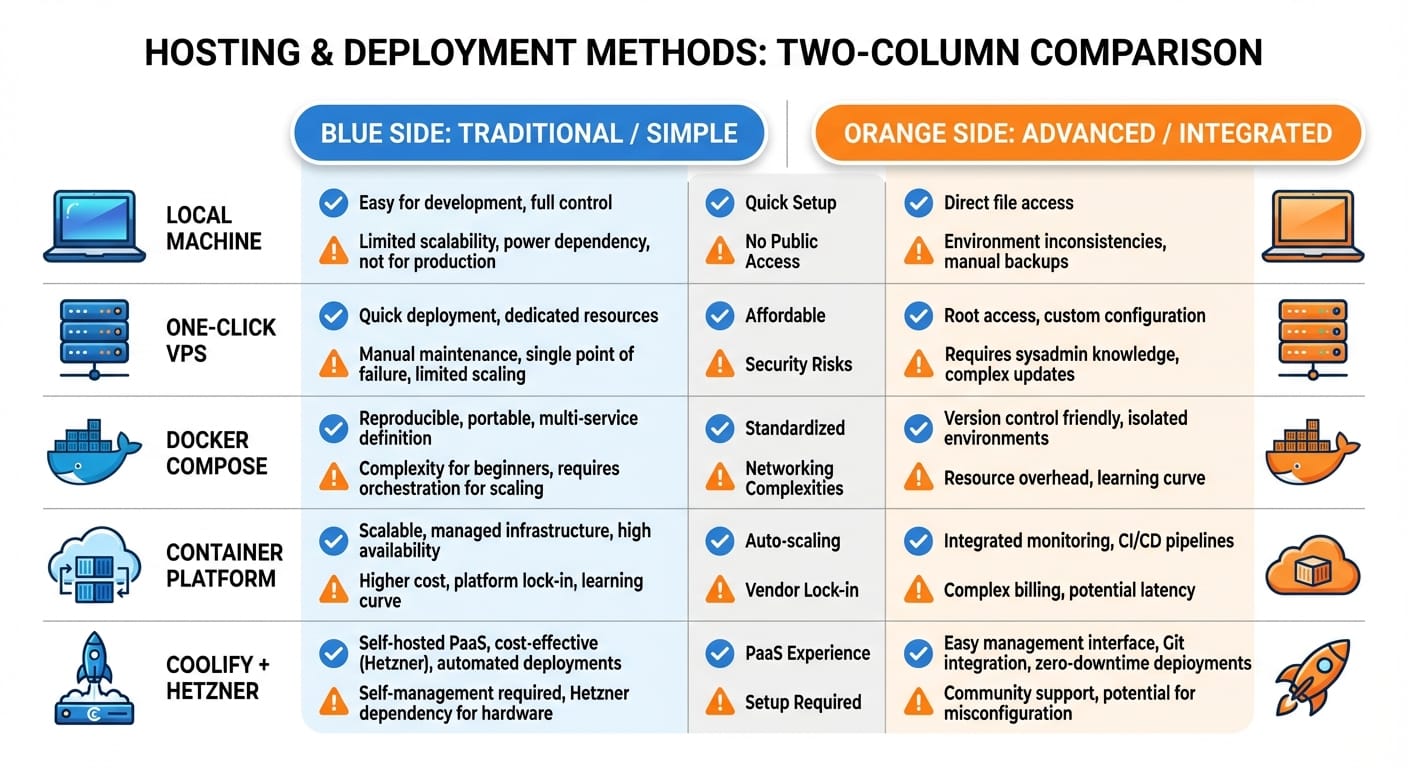
2) Basic VPS (one-click template) — best “first real deployment”
If you want always-on without becoming a Kubernetes wizard, a cheap VPS is the sweet spot. Some providers offer one-click n8n templates (Hostinger gets mentioned a lot because it’s beginner-friendly).
- Pros: cheap (~$5+/month), always-on, simple onboarding.
- Cons: you still own updates, backups, and scaling is limited unless you architect for it.
- Best for: solo builders, small teams, internal automations.
Source: common VPS approaches and costs referenced in self-hosting roundups and community discussion. [1][3][5][8]
3) Docker Compose on your own server — best for control freaks (compliment)
This is the DIY classic: you rent a VPS (any provider), install Docker, and run n8n with Docker Compose. You choose persistence, volumes, reverse proxy, and backups.
- Pros: maximum flexibility, portable, provider-agnostic.
- Cons: more setup, more knobs, more ways to mess it up at first.
- Best for: devs who want control and don’t mind ops.
Source: official Docker Compose examples and hosting guidance. Docker Compose docs [6].
4) Container platform (Northflank-style) — best for scaling without full-time DevOps
Platforms like Northflank let you deploy the n8n container, then attach managed PostgreSQL/Redis add-ons and scale workers. This hits a nice middle ground: more production-ready than a basic VPS, less brain-melt than building your own orchestrator.
- Pros: easier scaling, managed services, dashboards, health checks.
- Cons: platform fees, some lock-in to their way of doing things.
- Best for: teams, growing workloads, “I want reliability” people.
Source: container platform deployment patterns with Postgres/Redis and workers. [2]
5) Coolify + cheap cloud (like Hetzner) — best “pro setup on a budget”
Coolify is basically an open-source Heroku/Vercel vibe you can run on your own VPS. Pair it with a cost-effective provider (Hetzner is popular for price/performance), and you get a nice deployment UX without paying full managed-platform rates.
- Pros: production-friendly, developer experience is great, cost stays low.
- Cons: more technical than one-click VPS, you’re still operating the platform.
- Best for: builders who deploy often and like clean workflows.
Source: Coolify positioned as open-source PaaS for self-hosting. [4]
Here’s the thing... production n8n usually needs 3 extra ingredients
You can run n8n “single-container and vibes,” sure. But once it matters (reliability, history, concurrency), you’ll want to think about:
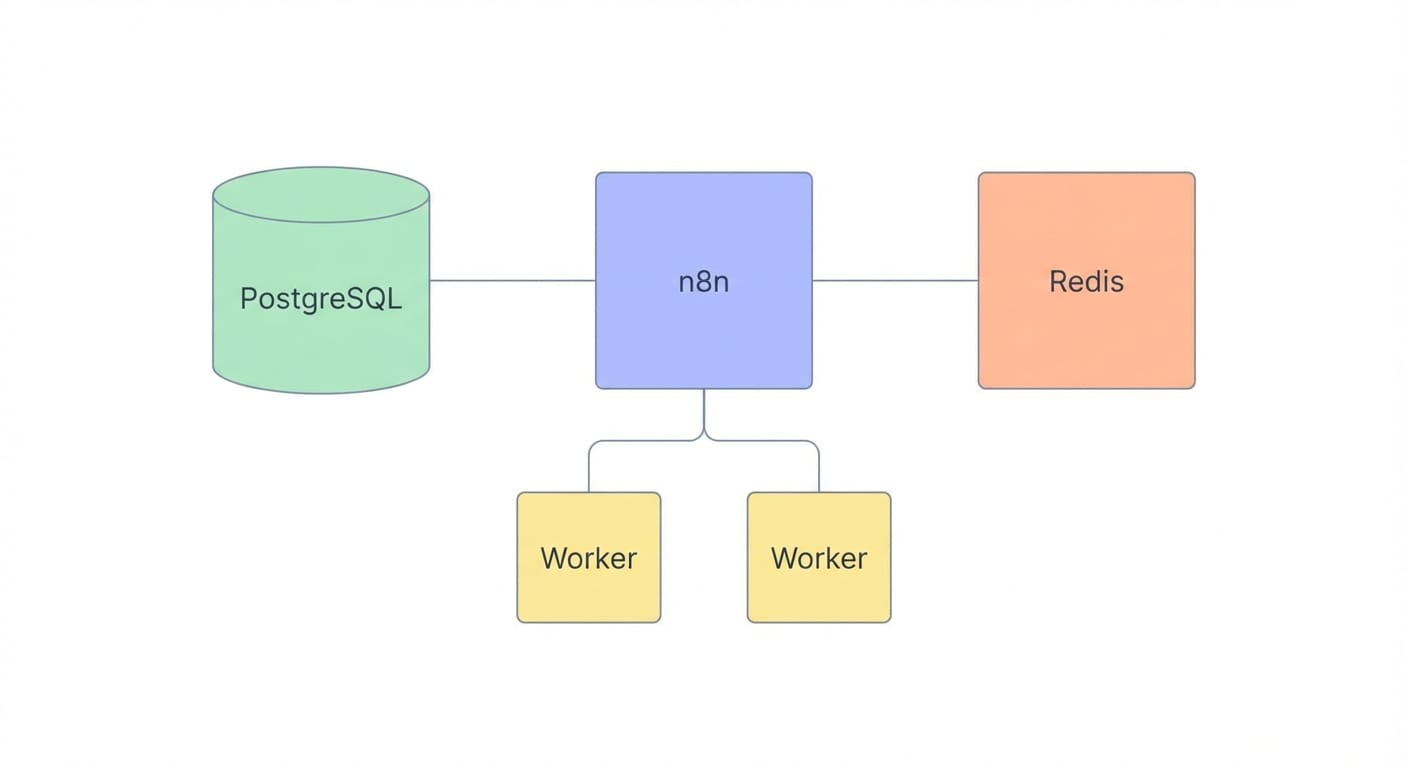
- PostgreSQL for persistence: so your data survives restarts and upgrades.
- Redis (optional) for scaling: especially if you’re adding workers.
- Workers for throughput: split web/UI from execution workloads to avoid timeouts.
That combo shows up in a lot of real deployments: n8n + Postgres, and Redis/workers when you need to scale executions.
Source: scaling patterns (Postgres/Redis/workers) referenced in self-hosting guidance. [2][6]
Common mistakes (aka how people accidentally make n8n painful)
- Running “production” on a laptop: works until sleep mode kills your automations mid-flight.
- Skipping backups: your future self will not find this funny.
- No update plan: n8n moves fast. Leaving it stale forever is how you get security and breaking-change surprises.
- Not planning for secrets: use environment variables and proper secret management where possible.
FAQ
Is self-hosted n8n really “unlimited”?
For Community Edition on your own infrastructure, you’re not dealing with the same usage caps you’d see in hosted plans. Your practical limit becomes your server capacity and architecture. n8n Docs [6].
What’s the cheapest “always-on” setup you’d actually recommend?
A small VPS (~$5/month) running Docker is the common entry point. If your provider offers a one-click n8n template, even better for getting started. [1][3][5]
Do I need PostgreSQL on day one?
If it’s just experimentation, no. If it’s business-critical or you care about durability, yes—add Postgres early so you don’t paint yourself into a corner. [2][6]
When should I consider a container platform instead of a VPS?
When uptime matters, you need easier scaling, or you want managed Postgres/Redis without maintaining them yourself. That’s when platforms earn their fees. [2]
Summary bullets (so you can decide fast)
- Local machine is for learning and testing—don’t ship it.
- One-click VPS is the easiest “real” self-hosted option.
- DIY Docker Compose is best if you want portability and control.
- Container platforms help you scale with less ops pain.
- Coolify + budget cloud is a killer pro setup if you’re technical.
The bottom line is... if you’re serious about automation, self-hosting n8n is often the best value in the room—just pick the option that matches your tolerance for maintenance.
Sources (as referenced): [1] n8n self-hosting benefits/limits summary (community/roundups), [2] n8n pricing and scaling notes, [3] Docker/local + VPS setup roundups, [4] Coolify positioning as open-source PaaS, [5] VPS provider comparisons, [6] Official n8n hosting/install docs, [7] self-hosting pros/cons commentary, [8] community provider discussions. Primary: https://docs.n8n.io/hosting/ and https://n8n.io/pricing/.