RAG Agents: The “Actually Useful” Way to Make AI Know Your Stuff
RAG agents let an LLM “look things up” in your docs before answering—cutting hallucinations, staying up-to-date, and making AI actually useful for your business.
Hot take: most “AI assistants” aren’t dumb… they’re just starving. You’re asking them questions while they’re locked in a room with only their training data and vibes. And then we act surprised when they confidently make things up.
That’s exactly why I’m bullish on RAG agents (Retrieval-Augmented Generation). They’re basically LLMs that are allowed to look things up before they open their mouth. Wild concept, right?
The real problem RAG solves (and why you should care)
Here’s the deal: a standard LLM is like a super smart intern with a great memory… from last year. It can be brilliant, but it’s also:
- Out of date (training cutoffs are real)
- Missing your private context (your docs, your policies, your product quirks)
- Prone to hallucinations (aka “confident fiction”)
RAG is the antidote. Instead of betting your business on whatever the model remembers, you give it a way to pull the most relevant info from your knowledge base at the moment you ask. That’s the hybrid: retrieval + generation. Sources back this up: the core RAG loop is retrieval of relevant documents (often via vector search) and then response generation grounded in that context. [1][3][6][7]
So… how do RAG agents work?
Let’s make this painfully simple. A RAG agent is like a bartender who doesn’t just freestyle a cocktail name—he checks the recipe book and what’s actually in stock.
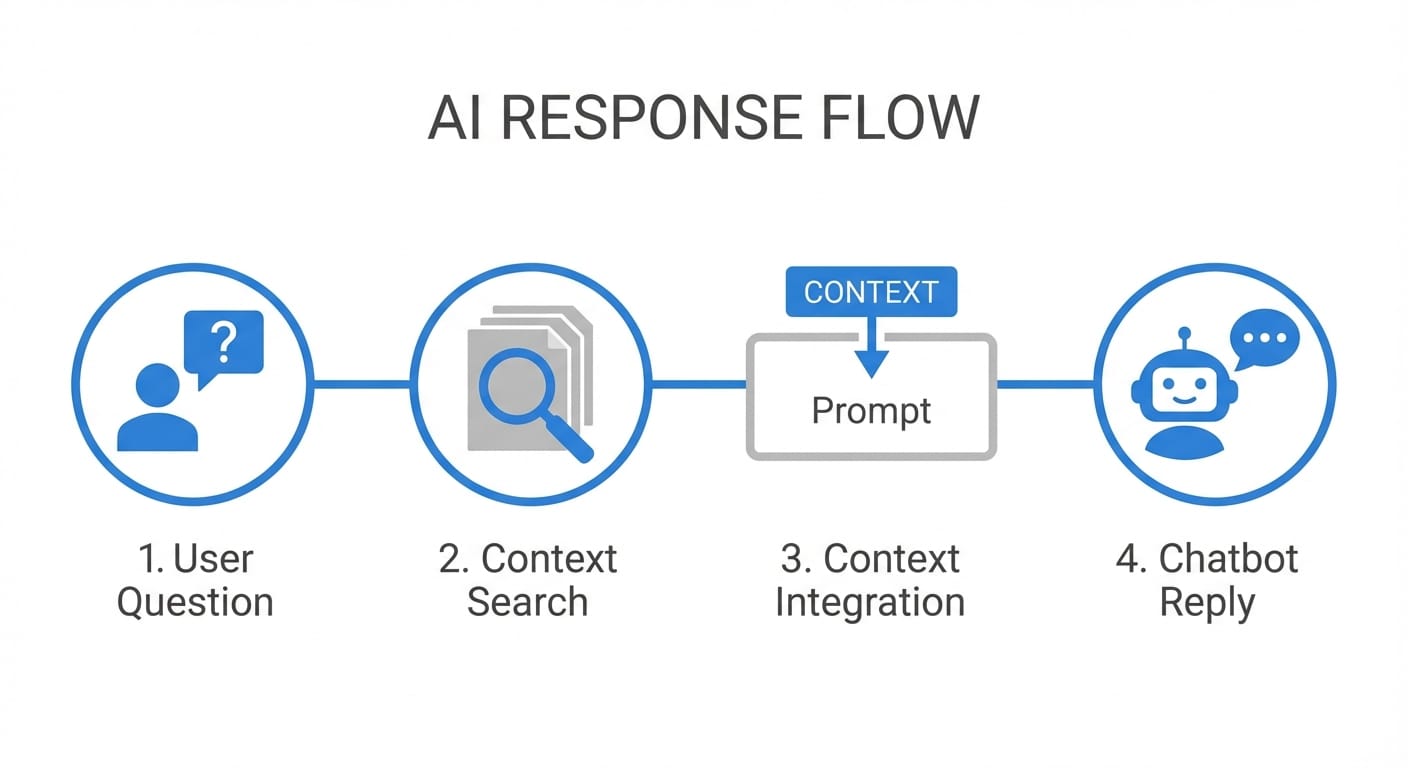
Here’s the step-by-step flow most RAG systems follow:
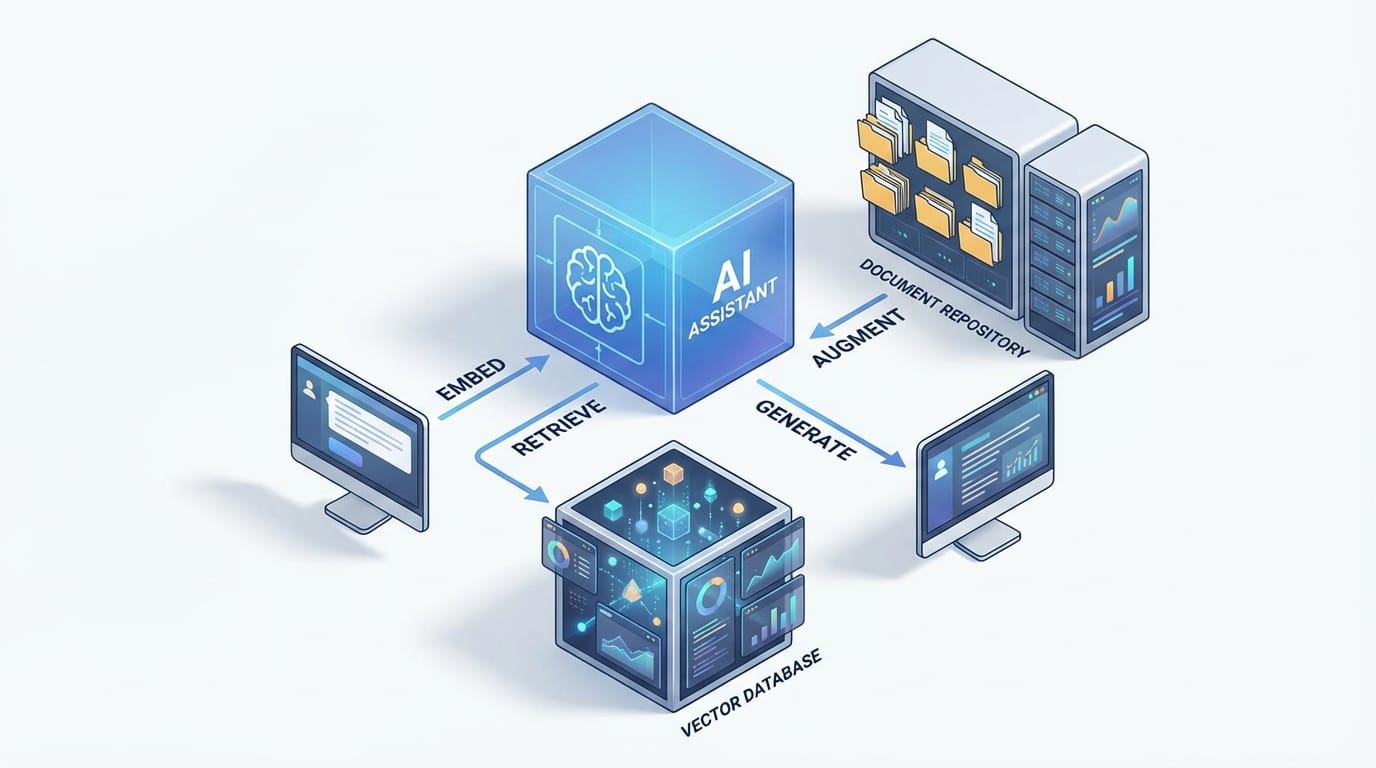
- Query embedding: Your question gets converted into a numeric vector so the system can search by meaning, not just keywords. [3][6]
- Retrieval: A search layer (often a vector database) grabs the most relevant chunks from your docs—manuals, policies, tickets, whatever. [1][3][6][8]
- Augmentation: Those retrieved chunks get injected into the LLM prompt as context. [1][7]
- Generation: The LLM writes an answer that’s constrained by (and ideally cites) what it just retrieved. [1][5][6]
- Optional refinements: You can add re-ranking, filters, and guardrails to improve relevance and reduce risk. [6][8]
And the “agent” part? That usually means it can do more than one step—like asking a clarifying question, running another retrieval pass, or checking multiple sources before responding. It’s less “chatbot” and more “assistant that knows how to use a library.”
Why RAG is beneficial to you (not just “in theory”)
Let’s talk outcomes. Not “AI transformation journey” nonsense—actual reasons you’d implement RAG.
1) You get fewer hallucinations (and more receipts)
RAG reduces hallucinations because the model is grounded in external, relevant data. Instead of guessing, it quotes your documents (or should). That’s why RAG is so common in support and knowledge-heavy domains. [1][2][3][5][6]
My stance: if your AI can’t cite sources, it’s not ready for customer-facing answers. Period.
2) Your AI becomes up-to-date without retraining
Retraining models is expensive and slow. RAG lets you keep the model as-is and update the knowledge instead. Add a new policy doc? Update the knowledge base. New pricing? Same. That’s the point: dynamic information without full model retraining. [2][4][6][7][8]
3) You can make it “yours” with proprietary data
Most businesses don’t need a smarter model—they need a model that knows their stuff: internal SOPs, product edge cases, sales enablement docs, incident postmortems. RAG is a clean way to adapt to domain-specific info without heavy fine-tuning. [3][4][6][9]
4) You often save money (yes, really)
Because the system retrieves only the most relevant chunks instead of stuffing huge docs into prompts, it can be more efficient than brute-force approaches. And again: no expensive retraining loops. [3][7][9]
5) You get trust + traceability (aka “show your work”)
When done right, RAG outputs can include citations and source snippets, which is gold for compliance, audits, and user trust. Users can verify the answer instead of praying it’s correct. [1][5][6][7]
Case study snippet (realistic and slightly painful)
Imagine you run a SaaS app with a decent-sized help center and an internal Notion full of “tribal knowledge.” Your support team gets the same 30 questions every week:
- “Does feature X work with SSO?”
- “Why did billing double this month?”
- “What’s the difference between roles A and B?”
Without RAG, an LLM might answer smoothly… and still be wrong because the help center changed last quarter. With RAG, the assistant retrieves the exact article, the latest billing policy, and the roles matrix—then responds with links/citations. That’s the difference between “cool demo” and “we can ship this.” [1][3][6]
Common mistakes (don’t do this)
- Dumping whole PDFs and praying: Retrieval works best on well-chunked, well-labeled content. Garbage chunks = garbage answers. Retrieval quality is a known limiter. [3][6][8]
- No re-ranking or filters: If you retrieve the wrong top results, the LLM will faithfully summarize the wrong thing. Add relevance tuning and guardrails. [6][8]
- Skipping citations: You lose trust instantly. If you can’t point to sources, you can’t debug either. [1][5][6]
Pro Tips Box (stuff I wish people told me earlier)
Pro tips for RAG that actually move the needle:
- Start with your top 50 support tickets and build the first knowledge set around them. Fast ROI.
- Chunk by meaning, not by character count (headers, sections, Q/A blocks). Better retrieval.
- Add a “source panel” in the UI so users can click what the answer used. Trust goes way up. [1][5][6]
- Log retrieved passages so you can debug bad answers like an engineer, not a mystic.
FAQ (because you’re probably wondering)
Do I need a vector database?
Often, yes—especially if you want semantic search at scale. Many RAG setups use vector databases to match meaning, not keywords. [1][3][6][8]
Will RAG completely eliminate hallucinations?
No. It reduces them by grounding answers in retrieved context, but if retrieval is wrong or the model ignores context, you can still get nonsense. That’s why re-ranking and guardrails matter. [6][8]
Is RAG only for chatbots?
Nope. It’s great for internal search, analytics assistants, compliance Q&A, sales enablement, and any workflow where answers must match documented reality. [1][2][3][4]
What’s the biggest lever for quality?
Content hygiene + retrieval quality. If your knowledge base is messy, RAG will politely serve mess. (Ask me how I know.) Limitations around retrieval dependency are well-documented. [3][6][8]
Action challenge: try this today
If you want to “feel” RAG’s value without a six-week platform build, do this:
- Pick one narrow domain (like refund policy or SSO setup).
- Collect 10–20 authoritative docs/snippets.
- Run a basic RAG prototype that retrieves 3–5 chunks and forces citations.
- Test it with real questions from Slack or support tickets.
You’ll know in a day whether you’ve got something worth scaling.
Sources
- [1] AWS — “Retrieval-Augmented Generation (RAG)” overview and workflow concepts.
- [2] NVIDIA — RAG benefits for freshness and accuracy compared to base LLM knowledge.
- [3] Pinecone — RAG architecture: embeddings, vector search retrieval, and grounded generation.
- [4] Google Cloud — RAG for enterprise and domain-specific knowledge integration.
- [5] arXiv / Meta — Foundational RAG paper (Lewis et al., 2020) discussing grounding and provenance.
- [6] Microsoft Learn / Azure — RAG patterns, guardrails, re-ranking, and operational considerations.
- [7] LangChain docs — Retrieval + prompt augmentation patterns for LLM apps.
- [8] Weaviate — Vector retrieval, hybrid search, and re-ranking considerations.
- [9] Databricks — RAG vs fine-tuning tradeoffs and efficiency notes.