NotebookLM for Productivity: Turn Your Info Pile Into a Decision Machine
My favorite productivity tools don’t “help me take notes.” They help me stop babysitting my notes.
If you’ve ever had 17 browser tabs open, three half-written docs, a PDF you swear you read last week, and a Slack message that says “can you summarize this?”… you already know the real problem: your information is scattered, and your brain is doing too much duct-tape work.
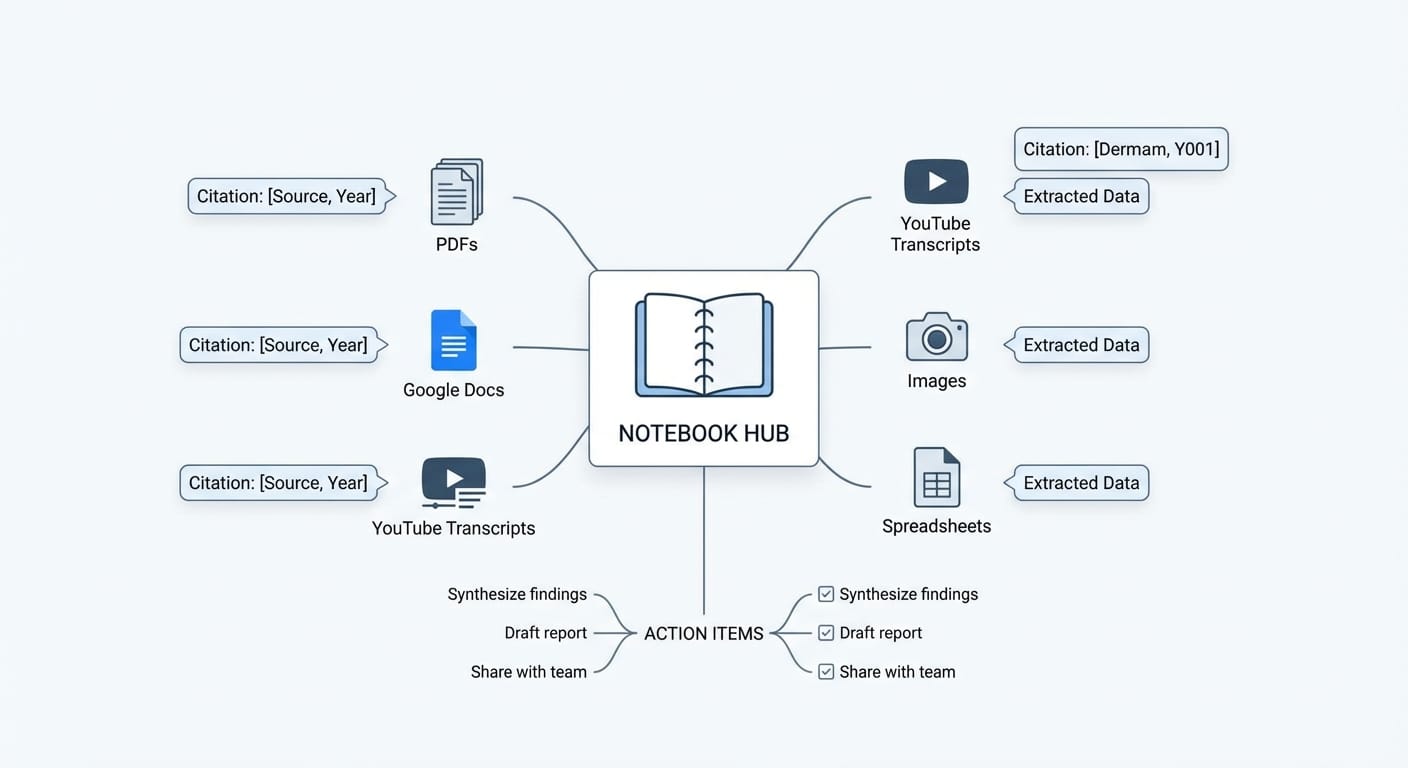
That’s where NotebookLM starts to feel less like “another AI thing” and more like a legit productivity upgrade. NotebookLM is Google’s AI-powered knowledge management tool that takes your own docs—PDFs, Google Docs, slides, websites, transcripts, even images—and helps you pull organized, cited answers out of them using Gemini AI [1]. Importantly, it’s designed to focus on your sources, not random web soup. That one decision makes it way more useful for real work.
Why NotebookLM feels different (and why I’m bullish on it)
Most AI tools are like that friend who’s confident about everything… even when they’re wrong. NotebookLM is more like a research assistant who won’t speak unless they can point to the page number.
NotebookLM’s answers come with citations back to the exact source material you uploaded [2]. That sounds small, but it changes everything. You can actually trust what you’re reading, verify it fast, and share it without the “uhh I think ChatGPT said…” energy.
It also supports up to 50 sources per notebook—PDFs, Docs, Slides, websites, YouTube transcripts, audio, images, and Sheets [2]. Translation: you can build a “project brain” instead of a folder cemetery.
The productivity play: Curate, Learn, Act
NotebookLM basically works best when you treat it like a three-step system: Curate, Learn, Act [1]. I like it because it mirrors how productive people actually work.
1) Curate: Stop collecting. Start organizing.
Here’s my spicy take: most “productivity problems” are actually collection problems. You’re hoarding inputs. NotebookLM forces a better habit: put the relevant materials for one goal into one notebook.
- Create one notebook per outcome (not per topic). Example: “Q1 Product Launch Messaging” beats “Marketing Stuff.”
- Upload only decision-relevant sources. If it won’t affect what you do next, it doesn’t belong.
- Name sources clearly (date + short label). Future-you will thank you.
Once your sources are in, NotebookLM can do source-specific analysis—meaning it’s grounded in exactly what you provided [1].
2) Learn: Get understanding faster than reading everything
This is where NotebookLM starts paying rent. It can generate:
- Audio/video overviews (podcast-style summaries) [2]
- Interactive mind maps to visualize how concepts connect [2]
- Flashcards and practice quizzes for rapid reinforcement [2]
I’m going to be honest: the audio overview feature is sneakily amazing. It’s like turning your docs into a commute-friendly “meeting” where two AI hosts discuss what matters. Is it a little weird the first time? Sure. Is it useful? Absolutely—especially when you need to ramp up on something fast.
Mind maps are the other sleeper hit. When you’ve got a pile of research, your brain tends to remember the loudest point, not the most connected one. Mind maps help you see the structure—like switching from reading a street list to seeing the whole city map.
3) Act: Turn insight into output (the part people forget)
Knowledge isn’t power. Knowledge that turns into a plan is power. NotebookLM has a bunch of “make stuff” features that shortcut the painful part of work:
- Visual artifacts like infographics and slide decks from your research [2]
- Deep Research reports that summarize what you have and point out gaps [2]
- Collaboration notebooks so teams work from the same source set [2]
If you’ve ever built a deck from scratch, you know the pain: the slides aren’t the hard part—the sourcing is. NotebookLM helps you jump straight from “pile of material” to “draft output,” while keeping citations tied to your originals.
My favorite real-world productivity uses (steal these)
The “Argument Surgeon” for conflicting info
Ever had two reports disagree, and your job is to figure out why? NotebookLM can help you compare claims across sources and point to exact citations [2]. It’s like having someone highlight contradictions so you can stop playing detective.
The “Visual Chaos Map” for big research
When you’ve got lots of sources, text summaries blur together. The interactive mind maps help you spot connections you’d miss otherwise [2]. This is perfect for strategy work, market research, or even planning a complex project.
The “Instant Visualizer” for exec-ready summaries
Need the 2-minute version for a stakeholder? NotebookLM can convert dense text into executive summaries and slide-ready content [2]. I’m not saying it replaces your judgment—but it absolutely kills the blank-page problem.
The “Image-to-Insight Engine” for whiteboards and handwritten notes
If you’re like me, you’ll take a photo of a whiteboard and then… never look at it again. NotebookLM can bring images into a notebook and help turn that messy scribble energy into organized action items [2].
The “Performance Narrative Crafter” for career growth
This one’s underrated: keep a notebook with your work journal—project notes, weekly wins, feedback, metrics. Later, NotebookLM can help you turn it into a coherent “growth story,” backed by citations [2]. That’s gold for reviews, promotions, or updating your resume without panic.
Customization: tell it who to be
One of the most practical features is custom instructions. You can literally say: “You’re my product manager,” or “You’re my academic tutor,” or “You’re my fitness coach,” and it will respond in that mode [1].
Think of it like setting the GPS voice. Same map, different guidance style. And for productivity, that matters. A “coach” will push you toward actions. A “research assistant” will stay cautious and cite everything. Pick what you need.
Limitations (because nothing is magic)
A couple reality checks:
- NotebookLM is strongest when your sources are good. Garbage in, garbage out—just with citations.
- Some alternatives are “lite.” For example, Open NotebookLM focuses on document chat and podcast generation, but you’ll need other apps for the broader productivity toolkit [4].
- You still need a workflow. NotebookLM won’t fix disorganization if you keep throwing everything into one endless notebook like it’s a junk drawer.
A simple workflow you can start today (15 minutes)
- Create a notebook for one active project (something you’ll finish this month).
- Add 5–10 key sources (not 50). Keep it tight.
- Ask three questions: “Summarize the core points and cite each one.”
- “What are the open questions or missing info?”
- “Draft the first version of my deliverable (email/deck/brief) using only these sources.”
- Generate an audio overview and listen while you walk or commute.
- Turn the output into tasks (because insights that aren’t scheduled are just trivia).
My bottom line
NotebookLM is productivity glue. Not because it’s flashy, but because it reduces the friction between information and action. It gives you a single place where your sources live, your answers are grounded, and your outputs are easier to create.
And in a world where everyone’s drowning in docs, that’s not a nice-to-have. That’s survival.
Actionable takeaways
- Start with one outcome-driven notebook (not a “misc” dumping ground).
- Use citations as your trust filter—if it can’t cite it, don’t ship it.
- Let audio overviews and mind maps do the heavy lifting when you’re ramping up fast.
- Close the loop: every NotebookLM insight should become a decision, a draft, or a task.
Sources
- [1] NotebookLM overview and Curate-Learn-Act framework; grounded in user-uploaded sources; custom instructions and persistent access.
- [2] NotebookLM features and supported source types; citations; audio/video overviews, mind maps, visual artifacts, learning tools, Deep Research, collaboration notebooks; real-world applications.
- [4] Open NotebookLM limitation compared to full NotebookLM feature set.