Make Your Notion Pages AI-Friendly (So ChatGPT Actually Quotes You)
Let’s be real: “SEO for AI” sounds like one of those buzzphrases people throw around to sell a course. But here’s the thing—AI search is already a traffic source. And if you’re publishing public Notion pages (docs, guides, templates, FAQs), you can absolutely make them easier for tools like ChatGPT and Perplexity to understand… and cite.
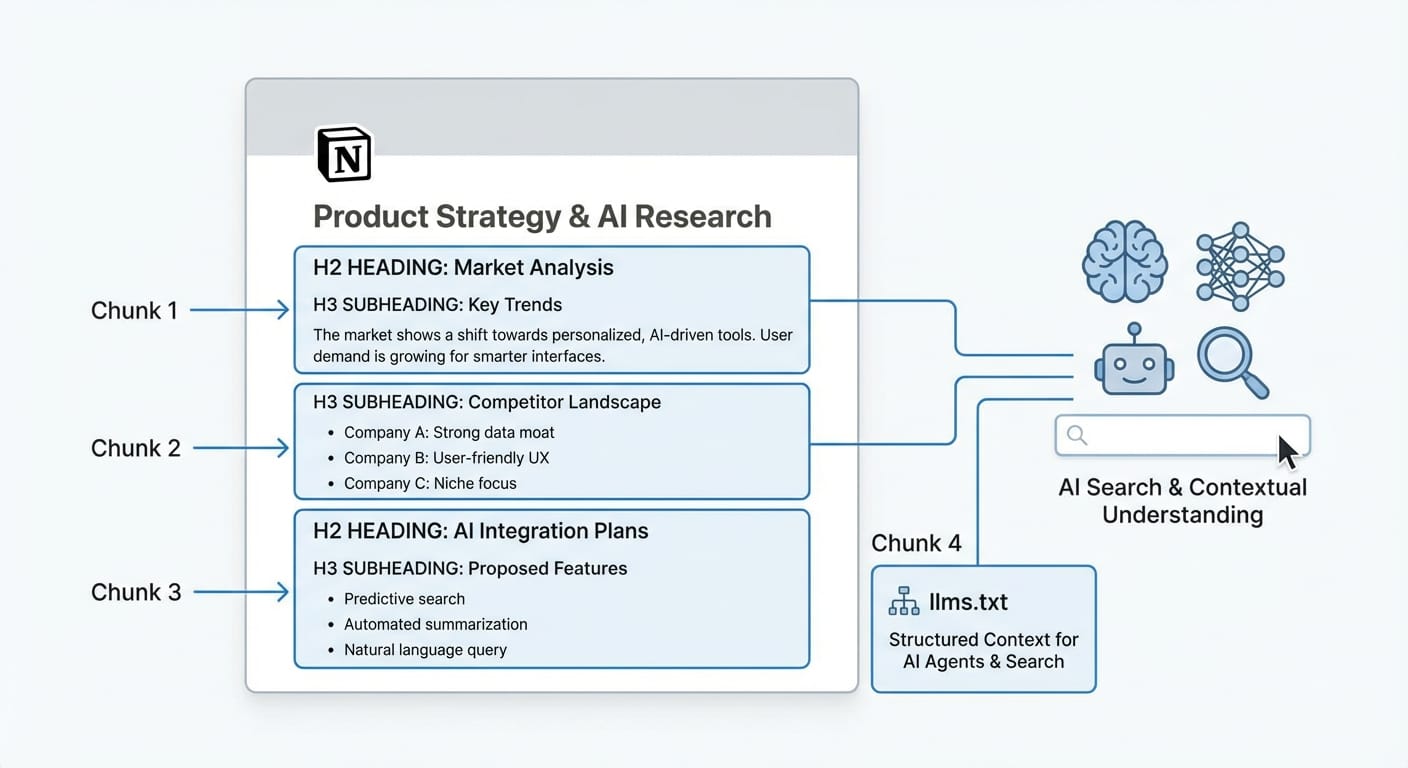
Think of it like this: your Notion page isn’t being “read” like a human reads it. It’s being chunked—broken into bite-sized passages—and the AI grabs the cleanest, clearest chunk that answers the question. If your page is one giant wall of text titled “Info,” good luck getting picked. If it’s structured like a helpful guide, you’ve got a shot. [1]
What AI “indexing” really means (in normal-person terms)
When people say “AI indexing,” they usually mean: Can an AI crawler find your page, parse it cleanly, and pull the right snippet when someone asks a question?
LLMs tend to prefer structured, markdown-like content with clear headings and short passages—less “keyword stuffing,” more “obvious meaning.” [1][3] So your job is to make the meaning ridiculously easy to extract.
Step 1: Stop naming pages like a raccoon labeled them
If your page is titled “Notes,” “Help,” “Resources,” or (my personal favorite) “Untitled”… you’re basically hiding from AI.
Do this instead
- Use descriptive titles: “How to Publish a Public Notion Help Center” beats “Help Center Stuff.” [1]
- Match real queries: If people ask “How do I connect Notion to X?” put that phrasing in a heading.
Why? Headings act like signposts for chunking and retrieval—AI tools can grab the section that matches the question faster. [1]
Step 2: Use headings like you actually want someone to find things
I’m going to say something mildly controversial: if your Notion page doesn’t have a heading hierarchy, it’s not “content,” it’s a diary entry.
A simple structure that works
- H1: The page title (Notion handles this)
- H2: Major sections (the “chapters”)
- H3: Specific questions, steps, or subtopics
This makes your page easier for LLMs to break into meaningful chunks and cite accurately. [1]
Step 3: Keep paragraphs short (because AI doesn’t want your novel)
Long paragraphs are where good answers go to die. LLMs tend to extract relevant snippets from smaller passages, not from a 40-line monologue. [1]
My rule of thumb
- 3–5 lines per paragraph
- One idea per paragraph
- If you feel yourself saying “and another thing…” that’s probably a new paragraph
It’s not about dumbing it down. It’s about making it skimmable for humans and cleanly extractable for machines.
Step 4: Use semantic formatting (aka: stop making everything a paragraph)
Here’s a fun fact: bullet points and tables aren’t just “nice formatting.” They’re signals. They tell the model, “This is a list of steps” or “This is a comparison.” That clarity helps the AI quote the right thing. [1]
Use these intentionally
- Bullets: steps, checklists, key points
- Numbered lists: processes people follow in order
- Tables: feature comparisons, pricing tiers, tool options
- Code blocks: anything technical (snippets, commands, configs)
Analogy time: if your page is a kitchen, semantic formatting is labeling the cabinets. Otherwise the AI is rummaging around like a hungry teenager.
Step 5: Pick one term and stick with it (yes, I’m serious)
Creators love variety. AI? Not so much.
If you call something “Help Center” on one page, “Support Hub” on another, and “Docs” somewhere else, you’re making the model guess whether those are the same thing. Consistent terminology improves accuracy and reduces weird, made-up answers. [1]
Practical move
- Create a tiny “canonical terms” section in your main page (or style guide)
- Use the same names everywhere: product features, menu labels, processes
Step 6: Publish in a way AI crawlers can actually understand
This is where most people stop too early. A public Notion URL is shareable, sure—but it’s not automatically optimized for AI discovery and structure signals.
Tools like Notiondesk can publish your Notion content to your domain and generate AI-focused files like llms.txt and llms-full.txt, which act like an “AI sitemap” and provide clear Markdown endpoints and priorities for crawlers. [1]
If you’ve never heard of llms.txt, don’t worry—you’re not behind. It’s basically the “robots.txt / sitemap.xml” vibe, but aimed at LLM-style consumption. And yes, it can help you get mentioned more reliably in AI answers. [1]
Step 7: Test it like a normal person would (with AI tools)
This part is underrated: you don’t have to guess if your content is AI-friendly. You can test it.
A simple testing loop
- Ask Perplexity or ChatGPT a question your page should answer
- Include your URL when possible
- Check whether it quotes the right section and uses your terminology
- If it’s fuzzy: add headings, shorten paragraphs, convert key steps to bullets
Some publishing tools even provide one-click ways to inject your page as context for testing, so you can see if the AI pulls the exact section you intended. [1]
A quick note on Notion AI vs public AI indexing
Notion AI can index your workspace content (and updates can take time depending on connectors), but that’s mostly about internal search and retrieval—not public discoverability. [2]
For public pages, the big win is still: simple, human-readable structure. Notion itself has emphasized that markdown-like representations perform better for model use than overly complex formats, especially given context window limits. [3]
My bottom-line stance
If you want AI to cite you, stop writing like you’re trying to impress an English teacher. Write like you’re trying to help a busy person solve a problem in 30 seconds.
Clear titles. Strong headings. Small chunks. Consistent terms. Publish in a way crawlers can map. Test and iterate. That’s it. That’s the game.
Actionable takeaways
- Rename vague Notion pages (“Info”) into query-friendly titles people actually ask. [1]
- Add a clean H2/H3 hierarchy so AI can chunk your content correctly. [1]
- Break paragraphs into 3–5 lines so snippets are easy to extract. [1]
- Use bullets, tables, and code blocks as semantic signals. [1]
- Standardize your terminology across every page. [1]
- Publish through a tool that generates llms.txt / llms-full.txt for AI discoverability. [1]
- Test with AI tools using your URL, then tighten structure where it gets confused. [1]
Sources: Notiondesk guide on optimizing public Notion pages for AI indexing and llms.txt generation [1]; Notion AI indexing behavior for workspace content/connectors [2]; Notion engineering guidance on markdown-like simplicity and context limits for model performance [3].