Should You Automate Short Video Creation with HeyGen + n8n? Here’s My Take
HeyGen can crank out short videos fast, and n8n can automate the whole pipeline—but only if you automate the boring parts and keep humans in the loop for judgment.

Hot take: you probably should automate short video creation with HeyGen and n8n… but only if you’re already sick of copy-pasting the same stuff into the same tools like it’s 2009.
Because let’s be honest—short video is the content equivalent of doing dishes. It’s not “hard,” it’s just endless. Scripts, hooks, captions, exports, posting, resizing, versioning… and somehow you still forgot to change the date in the CTA. Again.
HeyGen gives you the “make a video from text” magic. n8n gives you the “connect everything and stop touching buttons” magic. Put them together and you’ve basically got a content assembly line. The real question isn’t can you do it—it’s: should you?
The real problem: short videos are high leverage… and high friction
Short video is still one of the best attention magnets on the internet. TikTok, Reels, Shorts—pick your poison. But production is a grind, especially if you’re trying to post consistently.
Most teams I talk to fall into one of these traps:
- They post inconsistently because it takes too long to make a single decent clip.
- They batch-record once a month and then hate editing their own face for eight hours straight.
- They outsource and end up with videos that feel like “generic corporate human #4 explains synergy.”
Automation doesn’t fix strategy. It fixes friction. And friction is what kills consistency.
So what does “HeyGen + n8n automation” actually look like?
Think of this like a burrito line at Chipotle. You don’t want a chef reinventing burritos each time—you want a consistent process where you swap ingredients.
Here’s the common setup:
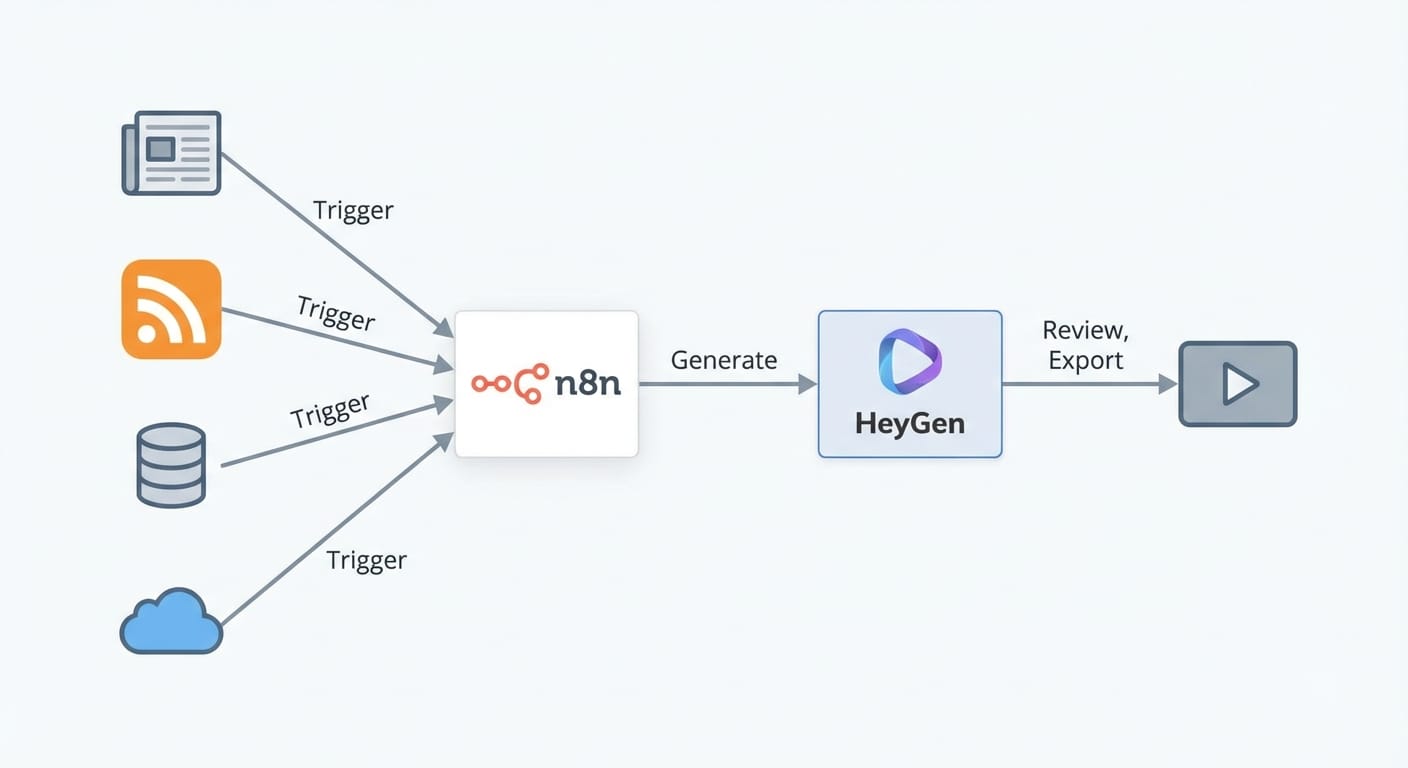
- Idea/source triggers: new blog post, newsletter, product update, a Google Sheet row, an Airtable record, an RSS item, etc.
- Script generation (optional): draft a 30–60 second script from your source text (often with an LLM step).
- HeyGen step: create the avatar video using a template, voice, and brand settings.
- Post-processing: auto-generate captions, add music, resize versions (9:16, 1:1, 16:9), name files cleanly.
- Distribution: push to a scheduler, a content folder, Slack approval queue, or directly to platforms (depending on your risk tolerance).
n8n is the glue here. It’s an automation workflow tool (similar category to Zapier/Make) that lets you chain triggers and actions and run them on your own infrastructure if you want. That last part matters if you care about cost, privacy, or both.
My stance: automate production, not judgment
I’m pro-automation. I’ve built businesses on it. But if you automate content without a “human checkpoint,” you’re basically asking a robot to represent your brand on the internet. What could go wrong?
The Bottom Line (TL;DR)
Yes, automate short video creation with HeyGen + n8n if you have repeatable formats and a real need for volume.
No, don’t automate it end-to-end if your content requires nuance, compliance, or a strong personal voice.
Where this combo shines (and where it faceplants)
It shines when…
- You have repeatable video templates (same structure, different topic). Example: “Tip of the day,” “Myth vs reality,” “3 mistakes people make with X.”
- You’re repurposing existing content (blogs, podcasts, webinars). Automation turns “we should clip that” into “it’s already done.”
- Your audience doesn’t require high cinematic polish. Many niches prefer clarity and frequency over perfection.
- You’re testing messaging. Want to A/B test hooks at scale? Automation makes that practical.
It faceplants when…
- You don’t have a strong format. If every video is different, you’ll spend more time maintaining the workflow than making content.
- Your brand depends on authenticity. Avatars can work, but if your audience expects “you,” they’ll smell automation from a mile away.
- You’re in a regulated industry. One unapproved claim can turn your “content engine” into a legal engine.
Common mistakes (don’t do these unless you enjoy pain)
- Automating before you have a winning template. Build one video format that works manually first. Then automate it.
- No review step. Add an approval checkpoint in Slack/email before publishing. It’s the seatbelt.
- Garbage in, garbage out scripting. If you feed HeyGen a rambling script, you’ll get a rambling video—only now it’s faster and more frequent.
- Ignoring brand consistency. Lock your fonts/colors/voice style. Automation amplifies inconsistency just as well as it amplifies quality.
Case study snippet: the “3 clips per blog post” machine
Let’s say you publish one blog post a week. You want three short videos from each post:
- Video 1: contrarian hook + main takeaway
- Video 2: “common mistake” angle
- Video 3: quick checklist / steps
With n8n, you can trigger on “new blog post published,” generate three scripts (or pull pre-written sections), send them to HeyGen using a consistent template, and drop the exports into a Google Drive folder called /ready-for-review. Your job becomes: watch, tweak, approve, schedule.
That’s the real win: you’re moving from creator to editor-in-chief.
FAQ (because I know what you’re thinking)
1) Is HeyGen good enough for serious marketing?
For a lot of use cases—yes. Especially explainers, onboarding, internal comms, and “talking head” style educational clips. If you’re trying to be a cinematic lifestyle brand, you’ll want real footage. Source: HeyGen product overview and capabilities documentation (HeyGen).
2) Why n8n instead of Zapier?
n8n is great when you want more control, more complex logic, and the option to self-host. Zapier is great when you want dead-simple and don’t care about cost at scale. n8n’s positioning and feature set are documented by n8n (n8n).
3) Will platforms penalize AI videos?
Platforms mostly care about viewer response (watch time, shares, retention). If your AI video is boring, it’ll flop. If it’s useful, it’ll live. But do pay attention to platform rules and disclosure norms. Start by reading each platform’s current guidance and stay conservative when in doubt.
4) What’s the minimum workflow worth building?
A single template + a single trigger + a single approval step. Example: “New row in Google Sheet → generate HeyGen video → post to Slack for approval.” Don’t overbuild it.
Pro Tips Box: how I’d set this up if it were my brand
- Use one avatar + one voice until you’ve got consistency. Variety comes later.
- Create a “hook library” (20–50 proven hooks) and rotate them programmatically.
- Store every script + output URL in Airtable/Sheets so you can audit what went live.
- Build a failure path: if HeyGen errors, notify you and keep the workflow moving.
- Batch approvals once daily. Don’t let automation turn into constant notifications.
Summary bullets (takeaways you can actually use)
- Automate short video creation when you have repeatable formats and need consistent output.
- Keep a human review step so automation doesn’t publish something weird at 2 a.m.
- Start small: one trigger, one template, one destination folder—then expand.
- Automation won’t fix weak content, but it will scale strong content fast.
Action challenge
Pick one piece of content you already have (a blog post, a sales email, a product FAQ). Create one HeyGen template. Then build the tiniest n8n workflow that outputs a draft video into a review folder. If you can’t get value from that… scaling up won’t help.
Sources
- HeyGen – Product site and features overview
- n8n – Workflow automation platform overview