Google Stitch Is Getting Scary-Good (and That’s a Good Thing)
Google Stitch is getting better at turning plain-English intent into usable UI and starter code. Here’s what’s improving, what to avoid, and how to use it without creating a mess.
Hot take: most “AI dev tools” aren’t really helping you build faster — they’re just moving the pain around. But Google Stitch? It’s starting to feel like the rare exception where the boring parts actually get automated, and the fun parts (deciding what to build) get more time.
If you haven’t bumped into Stitch yet, think of it like this: you describe what you want (in plain English, sometimes with a screenshot or a rough UI idea), and Stitch helps generate the UI and the code scaffolding to get you moving. It’s not “press button, ship unicorn.” It’s more like having a competent junior dev who never sleeps and doesn’t get offended when you say, “Nope, try again.”
The real problem Stitch is trying to solve

Building software is weirdly lopsided. The “idea” part is fast. The “make it real” part is slow. And not because writing code is hard (okay, sometimes it is), but because of all the glue work:
- Turning requirements into UI screens
- Picking a component library
- Creating consistent layouts, spacing, typography
- Wiring up navigation and states
- Doing the same setup you did on the last five projects
That’s the stuff that makes teams miss deadlines and makes solo builders abandon side projects. Stitch aims straight at that grind: generate a usable UI + starter code quickly, so you can spend your brainpower on what actually matters — product decisions and edge cases.
What’s actually advancing with Google Stitch (the stuff that matters)
Here’s where I’m seeing Stitch get meaningfully better (not just “we added a new button” better). I’m keeping this practical — if it doesn’t change your day-to-day, it doesn’t count.
- Better prompt-to-UI fidelity Early generative UI tools had the attention span of a goldfish. You’d ask for “simple, clean, two-column settings page” and get something that looked like a casino menu. Stitch is getting better at matching intent: layout, hierarchy, and basic UX patterns actually line up with the request.
- Cleaner component structure (less spaghetti) The difference between “demo code” and “real code” is maintainability. Stitch outputs are trending more reusable: clearer components, more consistent naming, fewer one-off hacks. That matters because you’re not just generating UI — you’re inheriting it.
- Faster iteration loops This is the killer feature in practice. The win isn’t that Stitch gets it perfect on the first try. The win is that your second and third tries are cheap. “Make it more compact.” “Add an empty state.” “Make the primary CTA sticky.” That conversational loop is where time disappears in normal dev cycles.
- More usable defaults (design system-ish behavior) When a tool gives you decent spacing, typography, and consistent components by default, you ship faster. Stitch is increasingly acting like it has “taste.” Not perfect taste. But good enough that you’re polishing instead of rescuing.
- Better alignment with modern front-end workflows A lot of AI UI generators die at the handoff: they give you a pretty picture, then you still have to build the app. Stitch is trending toward giving you something that fits real workflows (components you can move into your repo, patterns that resemble how teams structure UI).
My opinion: the biggest advancement isn’t “AI can design now.” It’s that we’re finally getting iteration speed that feels like design and dev are happening in the same room again.
The Bottom Line
Stitch is getting better at turning intent into a workable starting point. If you treat it like a first-draft machine (not a final-build machine), it can shave days off UI-heavy projects.
Quick wins: how I’d use Stitch this week
If you’re wondering “Cool, but what do I do with it?”, here are a few low-risk ways to get value without betting your whole codebase on it.
- Generate a settings area (profile, notifications, billing). These screens are repetitive and perfect for scaffolding.
- Prototype onboarding flows fast. You can test copy + steps with users before you build the backend.
- Create empty/loading/error states consistently. This is the stuff people forget until the last second.
- Spin up internal tools (admin dashboards, CRUD panels). It’s not glamorous, which is exactly why you should automate it.
Pro Tips Box: how to get good outputs (without becoming a prompt wizard)
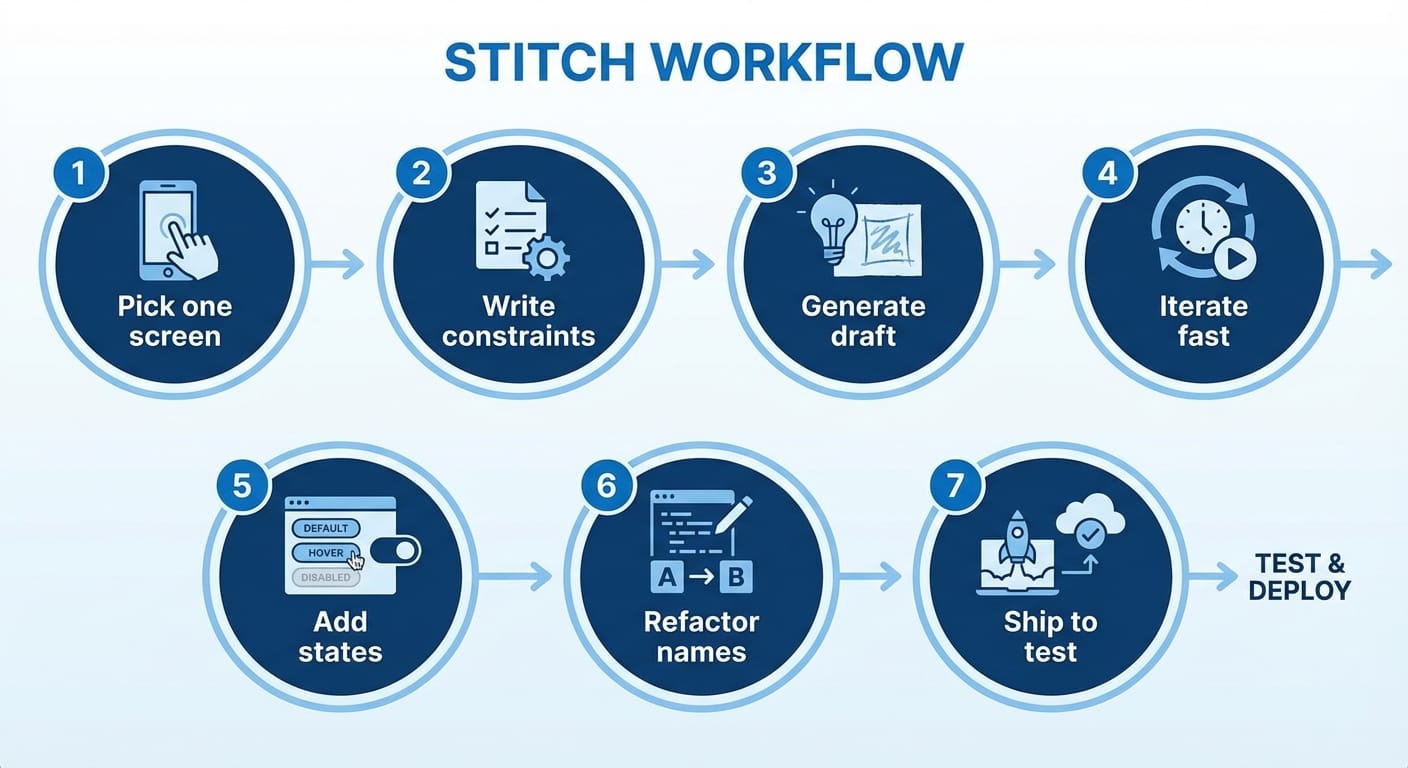
1) Ask for structure, not vibes. “Two-column layout: nav left, content right” beats “modern settings page.”
2) Specify states. Tell it: empty, loading, error, and success. Your future self will thank you.
3) Lock a component pattern early. Once you like a card/list/table pattern, say “reuse this pattern across screens.” Consistency is half of “good design.”
4) Don’t accept weird naming. If you see Component123, make it regenerate or rename immediately. Messy names are like leaving food out — it gets gross fast.
Common mistakes I see people make
- Trying to generate the entire app at once. That’s like asking for “a house” instead of “a kitchen layout.” Break it into screens.
- Not giving constraints. If you don’t mention mobile/desktop, accessibility, or branding, you’ll get defaults you didn’t choose.
- Treating generated code as sacred. It’s a draft. Refactor it. Add linting. Make it yours.
FAQ
Is Stitch replacing designers or developers?
No. It’s replacing busywork. If anything, it makes good designers and devs faster because they can iterate more.
Is it production-ready code?
Sometimes parts of it, sure — but assume “starter code” unless you’ve reviewed it like any other PR. Generated doesn’t mean vetted.
Where does Stitch fit vs. Figma and code-first frameworks?
I see it as a bridge: faster than hand-designing everything in Figma first, and less tedious than bootstrapping UI from scratch in your framework.
So… should you care?
If you build products, prototypes, internal tools, or pretty much anything with screens — yeah, you should care. Not because Stitch is magic, but because it compresses the “blank page to something testable” phase. And that phase is where momentum goes to die.
One more stance before I go: the teams who win with tools like Stitch won’t be the ones who generate the most code. They’ll be the ones who validate the most ideas per week.
Action challenge
Pick one screen you’ve built a dozen times (settings, dashboard, onboarding). Use Stitch to generate a first draft, then spend 30 minutes tightening it: rename components, add empty/loading states, and make one UX improvement you’d normally “save for later.” That’s how you turn AI scaffolding into real velocity.
Sources
- Google AI for Developers (official docs and updates)
- Google AI Blog (product announcements and research direction)