Automation Isn’t Failing You — Your Rollout Plan Is
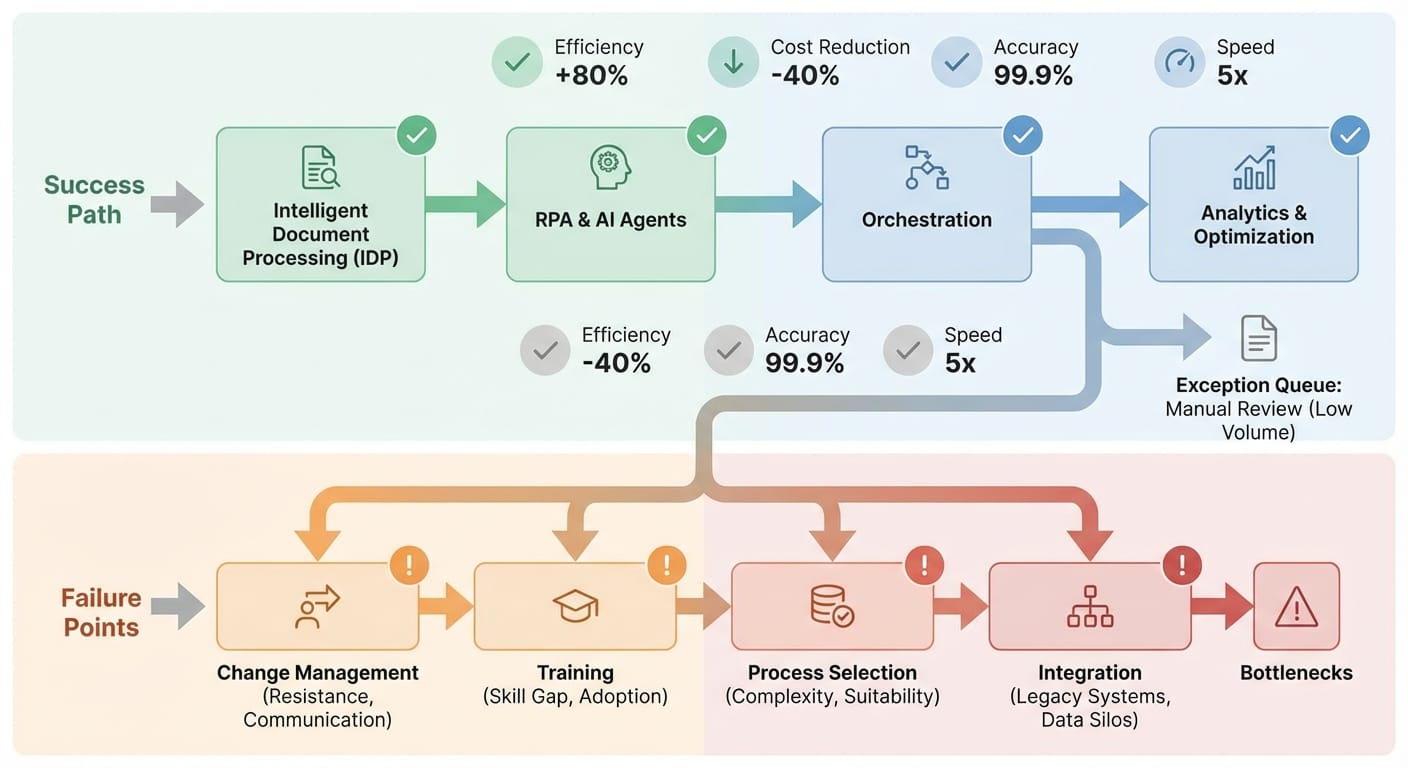
95% of generative AI pilots fail. Yep, you read that right. And it’s not because the tech is “not ready.” It’s usually because businesses roll automation out like it’s a software install… when it’s actually a behavior change project with some software attached. [2]
If you’re a business owner looking at automation (BPA, RPA, AI agents, the whole alphabet soup), you’re probably thinking: “Cool, we’ll save time, reduce errors, and stop paying humans to do robot work.” And you’re not wrong. But here’s the part most folks skip: automation doesn’t fail in the codebase—it fails in the company.
Why most automation initiatives faceplant
Let’s define “automation failure” the way it usually shows up in real life:
- The tool technically works… but nobody uses it.
- It sort of works… but exceptions explode and the team loses trust.
- It works for one month… then breaks quietly and becomes “that old project.”
- It never gets out of pilot purgatory.
And the research backs this up. The top reasons businesses fail at automation implementation are mostly people/process problems, not technology problems:
- Weak change management causes about 35% of BPA failures. [1]
- Insufficient training accounts for 31%—and fewer than 1 in 10 companies train teams adequately. [1]
- Poor process selection hits 28% (translation: automating the wrong thing). [1]
- Overly optimistic timelines show up in 24% of failures. [1]
- RPA abandonment can be as high as 70% before implementation due to poor process visibility and missing maintenance plans. [1]
- Digital transformation efforts miss the mark around 70% of the time. [4]
So if you’ve ever thought, “Why is this so hard? It’s just software.” Well… it’s because it’s not just software.
The solution (without the buzzword bingo)
I’m going to walk you through a practical playbook. Think of it like remodeling a kitchen: the shiny new appliances are fun, but if you don’t fix the plumbing and teach everyone where the light switches are, dinner’s still not happening.
Step 1: Pick a process that actually deserves automation
This is where I see a lot of businesses go wrong. They start with something “easy” or “visible,” not something that’s a good fit.
Here’s my opinion: start in the back-office. It’s less political, more measurable, and often has cleaner ROI. The research even points out that budgets often over-index on sales/marketing GenAI, while the biggest ROI comes from back-office workflows. [2]
Look for processes with these traits:
- High volume, repetitive steps
- Clear rules (or at least clear decision points)
- Stable inputs (same forms, same systems)
- Pain you can measure (time, cost, error rate)
Example: invoicing and AP/AR workflows. Automating invoicing can reduce errors massively and save real money (one cited outcome: ~$46K/year savings). [1]
Step 2: Map the messy reality (not the “official” process)
If your process doc says “Step 3: Approve invoice,” but in reality Sharon prints it, walks it to Accounting, and then someone retypes it into the ERP… congrats, your process doc is fan fiction.
Before you automate anything, you need to capture:
- Where the data is born (email? portal? PDF? spreadsheet?)
- Every handoff (and why it happens)
- Every exception (and how often it happens)
- Every “tribal knowledge” rule (the stuff only Carla knows)
This step alone prevents a lot of that “why did the bot do THAT?” drama later.
Step 3: Treat adoption like the main product
Here’s the uncomfortable truth: your automation project isn’t done when it ships. It’s done when it becomes normal.
And the data is blunt: change management is the #1 failure driver (35%), and training is right behind it (31%). [1]
So what does “real” change management look like?
- Name an owner who’s accountable for outcomes, not just “implementation.”
- Train like you mean it. Not a 30-minute demo. Role-based training + practice + cheat sheets.
- Empower line managers to drive adoption (not just a central innovation team). This aligns with what research highlights: adoption happens closer to the work. [2]
- Set new expectations: what the human still owns vs. what the system owns.
Step 4: Don’t “pilot” yourself into a corner
I’ve got nothing against pilots. But most pilots are basically a science fair project: impressive demo, no path to production.
That’s one reason 95% of generative AI pilots fail—they don’t integrate into real workflows, and teams hit a “learning gap” where tools don’t adapt to the way work actually happens. [2]
My stance: only run a pilot if you can answer these questions up front:
- What system will this integrate with on day 60?
- Who maintains it after launch?
- What KPI proves it worked?
- What’s the exception-handling path?
Step 5: Measure the boring stuff (that actually matters)
Automation ROI gets weird because leaders measure “time saved” and teams feel “friction added.” So you need operational KPIs that don’t lie.
In finance automation, leaders prioritize accuracy heavily (61.6%), and one of the biggest problems is getting stuck in partial automation (54%) where exceptions pile up. [3]
KPIs I love for automation projects:
- Cost per transaction (e.g., cost per invoice)
- Cycle time (start → finish)
- Error rate / rework rate
- Exception rate (and average time to resolve)
- Percent of workflow fully automated (not just “we automated one step”)
Also: if you’re using AI, push for explainability. “The model said so” is not a business process. Lack of explainability is a real trust-killer (35.8% cite it). [3]
The Bottom Line (mid-post TL;DR)
- Automation fails mostly due to people + process issues, not tools. [1]
- If you don’t plan training, ownership, and maintenance, you’re basically scheduling your own postmortem. [1]
- Start with measurable back-office workflows for cleaner ROI. [2]
Common mistakes (a.k.a. “please don’t do this to yourself”)
- Automating a dumpster fire. If the process is broken, automation just helps it fail faster.
- Choosing the flashiest use case. “AI that writes sales emails” is fun. “AI that fixes invoice exceptions” pays the bills. The ROI often lives in back-office. [2]
- Underinvesting in training. Most companies do this, and it shows. [1]
- No maintenance plan. This is a big driver of RPA abandonment (up to 70% pre-implementation). [1]
- Accepting partial automation as ‘done.’ Partial automation creates more exceptions, slower cycles, and distrust. [3]
Case Study Snippet: “The AP Bot That Everyone Hated”
Let’s make this real with a (very) realistic composite example.
A 40-person services company builds an automation to extract invoice info from PDFs and create bills in their accounting system. First week? Everyone’s impressed.
Week three? The AP clerk is spending more time cleaning up exceptions because:
- Vendors change invoice formats
- PO numbers are missing
- Approvals are inconsistent
The bot isn’t the villain. The villain is that nobody mapped exceptions, nobody defined a clean approval rule, and nobody trained managers on the new workflow. So the “automation” becomes a tax on the team.
Fix? They add an exception queue, a simple policy (“no PO, no pay”), role-based training, and a weekly metrics review. Exception rates fall, trust returns, and the bot becomes boring—in the best way.
Pro Tips Box: My practical automation playbook
- Buy before you build if automation isn’t your core business. Vendor partnerships succeed more often than internal builds (67% vs. 33%). [2]
- Use a “two-lane” design: Lane A = straight-through automation. Lane B = exception handling with humans.
- Make line managers the champions, not just an IT/project team. Adoption happens where the work happens. [2]
- Force a KPI baseline before touching any tools. If you don’t know today’s cycle time, tomorrow’s “improvement” is vibes.
FAQ
1) Should I start with RPA, BPA, or GenAI?
Start with the workflow and the outcome, not the acronym. If it’s clicking around legacy systems, RPA can help. If it’s end-to-end process redesign, BPA. If it’s messy text and classification, GenAI might fit—but only if you can integrate and govern it. And remember: GenAI pilots fail at a brutal rate when they don’t plug into real workflows. [2]
2) What’s the #1 sign we’re about to fail?
If nobody owns adoption and training, you’re in trouble. Change management (35%) and training (31%) are the top failure drivers for a reason. [1]
3) How long should an automation rollout take?
Longer than your vendor’s sales deck suggests. Overly optimistic timelines are a known failure factor (24%). [1] I like 4–8 weeks for a tight pilot with a clear path to production, then 8–16 weeks to scale across teams depending on integrations and change management.
4) Do small businesses actually have an advantage here?
Often, yes. Small and mid-sized businesses can be more nimble (reported success ~65% vs. 55% for large ones). But ROI is still not guaranteed—only about 26% of initiatives deliver expected ROI. [1]
Action Challenge: do this one thing today
Pick one process you’re thinking about automating and answer these three questions in writing:
- What’s the baseline? (cycle time, cost, error rate)
- What are the top 10 exceptions? (and how often do they happen)
- Who owns adoption? (training, enforcement, ongoing tweaks)
If you can’t answer those, don’t buy another tool yet. You don’t need “more AI.” You need a plan that your team can actually live with.
Citations: [1] Research data provided (BPA/RPA failure reasons, training, change management, ROI stats). [2] Research data provided (GenAI pilot failure rate, vendor vs. internal build success, budget misalignment, integration/learning gap). [3] Research data provided (partial automation in finance, explainability trust issues, accuracy priority). [4] Research data provided (digital transformation shortfall rate).