Stop Overthinking AI: Build a Simple Workflow That Actually Saves You Time
AI doesn’t save you time by itself—workflows do. Here’s a simple, repeatable AI workflow you can copy to cut busywork and ship consistent results.
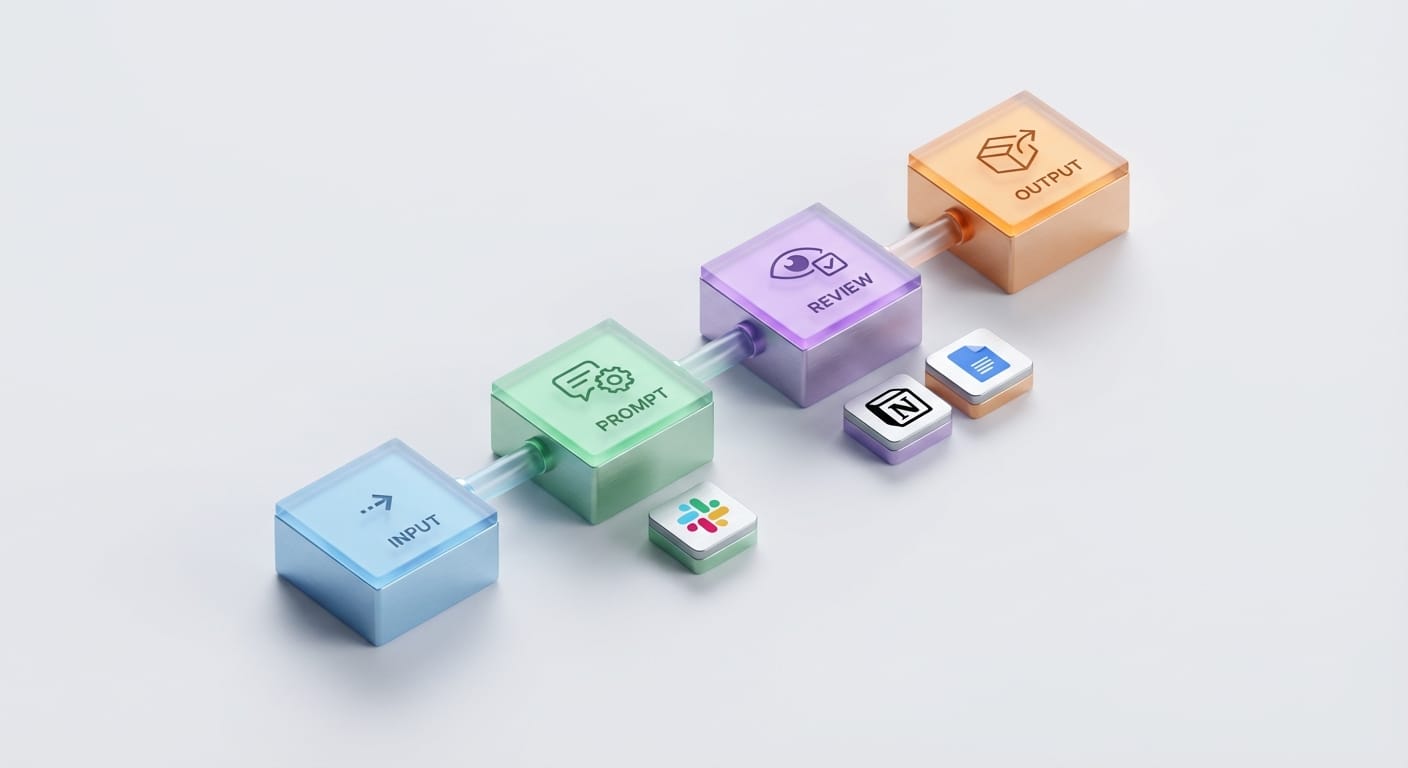
Here’s my hot take: most people don’t “need more AI.” They need less chaos.
Because what’s the point of having ChatGPT, a dozen browser tabs, and five half-finished prompts… if you still end your day thinking, “Wait—what did I even get done?”
The video you shared hits a point I agree with way too much: the real power move isn’t chasing the newest model—it’s building a repeatable workflow where AI does the boring parts and you do the human parts. That’s the whole game.
The real problem: AI tools are easy… workflows are hard

Let’s be honest: using AI is the fun part. It’s like buying a bunch of new kitchen gadgets. The problem is dinner still isn’t cooked.
Most folks get stuck in one of these loops:
- The prompt spiral: “If I just tweak this prompt one more time…” (famous last words)
- The app-hopping Olympics: ChatGPT → Docs → Notion → Slack → back to ChatGPT
- The ‘I’ll automate it later’ lie: You won’t. Later is a myth.
What the video does well is nudge you toward a system: capture inputs, run repeatable steps, produce a consistent output. That’s not sexy… but it works.
A simple AI workflow you can steal (and actually use)
I’m going to lay this out like I would for a teammate. No fluff. Just something you can implement this week.
1) Pick one task you do every week
Not ten. One. If you pick too big a project, you’ll procrastinate forever.
Good candidates:
- Writing meeting notes and follow-ups
- Turning a long article/video into social posts
- Summarizing customer calls into product insights
- Creating weekly status updates
My opinion: if the task doesn’t repeat, don’t automate it. That’s like building a factory to make one sandwich.
2) Define the “inputs” like you’re building a funnel
Every workflow has to start somewhere. In the video, the big idea is: stop treating AI like a one-off chat and start treating it like a process that eats predictable ingredients.
Examples:
- A YouTube link
- A Zoom transcript
- A folder of PDFs
- A Slack thread
If your inputs are messy, your outputs will be messy. AI doesn’t fix chaos—it amplifies it.
3) Create a “middle layer” prompt you reuse
This is where people screw up. They write prompts like they’re texting a friend: vague, inconsistent, and emotional.
Instead, write a reusable prompt template like:
You are my assistant. Do three things: 1) Summarize the content in 5 bullets. 2) Extract action items and owners. 3) Create a 150-word update I can paste into Slack. Constraints: Use plain language. No buzzwords. If information is missing, say “Unknown.” See what happened? We removed “guessing” from the model and made it behave more like a machine. That’s the goal.

4) Ship the output somewhere you’ll actually see it
Outputs that don’t land in your real workflow are basically motivational posters.
Pick one destination:
- Notion database
- Google Doc
- Slack channel
- Trello/Asana task
This is where automation tools (or even a simple copy/paste habit) make AI feel “real.”
Common mistakes (I’ve made all of these, sadly)
- Trying to automate the whole business: Start with one annoying task. Earn your way up.
- Not standardizing inputs: If one transcript is clean and the next is garbage, your results will wobble.
- Forgetting a human “QA step”: AI outputs need a quick sanity check, especially if customers will see it.
- Measuring nothing: If you don’t track time saved (even roughly), you’ll abandon it.
Pro Tips Box: Make AI boring on purpose
- Name your workflow like a function: “Summarize_Call_Into_CRM”. If it sounds nerdy, good.
- Lock a format (bullets, headings, word count). Consistency beats creativity here.
- Add a failure mode: “If you’re unsure, ask one clarification question.”
- Keep a prompt library in a doc. Reuse beats reinvent.
FAQ
Do I need automation tools to do this?
Nope. Start manually. If you do it three times and it feels valuable, then automate.
What’s the fastest workflow to start with?
Meeting notes → action items → Slack update. Low risk, high payoff.
Is this safe for sensitive info?
Depends on the tool and your data policies. For anything sensitive, use enterprise controls or avoid sending private content. (More on that in the sources below.)
How do I know if it’s working?
If you’re saving 30–60 minutes a week consistently, that’s a win. Don’t overcomplicate it.
What I liked about the approach in the video
The vibe is basically: stop treating AI like a slot machine and start treating it like plumbing. Not glamorous, but when it’s installed right, you forget it exists—and everything flows.
That’s the mindset shift I want more people to make in 2026: AI isn’t just for “content.” It’s for operations. The boring stuff. The repeatable stuff. The stuff that quietly drains your day.
Summary bullets
- Pick one repeating task and build a workflow around it.
- Standardize inputs or AI will amplify your mess.
- Write reusable prompt templates with strict formats and constraints.
- Deliver outputs where work happens (Slack/Notion/Docs), not in a forgotten chat.
- Add a quick human review and measure time saved.
Sources
- OpenAI Privacy Policy (data handling basics)
- Google Workspace & Gemini privacy/controls overview (enterprise/admin considerations)
- NIST AI Risk Management Framework (practical guidance for managing AI risk)