AI Isn’t Magic — It’s a Money-and-Time Cheat Code (If You Use It Right)
AI isn’t magic—it’s a practical tool that kills busywork and boosts revenue when you aim it at the right tasks. Here are 7 real ways to use AI to save hours every week and turn that time into money.

AI won’t replace you. But the person who knows how to use it absolutely might. And yeah, that sounds dramatic… but I’ve seen it play out in real life. The folks who treat AI like a practical tool (not a sci-fi toy) are shipping faster, replying faster, selling faster, and generally running circles around everyone else.
So let’s make this simple: if time is your most limited resource, and money is just a scoreboard for how well you deploy that time… why wouldn’t you want a “force multiplier” sitting on your laptop?
The real problem: you’re drowning in “work about work”
Most people don’t lose their days to the big meaningful tasks. They lose them to the thousand little barnacles stuck to the boat:
- Emails you already know how to answer
- Status updates nobody reads
- Meeting notes you’ll never revisit
- Research rabbit holes
- Copy/paste busywork across five tools that hate each other

That’s where AI shines: it eats the repetitive, the templated, and the “I know what to do, I just don’t want to do it.”
7 ways AI helps you save time and make more money (without turning into an AI bro)
I’m going list-style here because you’re busy. Let’s keep it moving.
1) Turn your inbox into a drive-thru
Use AI to draft replies, summarize long threads, and pull out action items. The trick is to have it write your voice, then you edit. Think of it like a sous-chef: it chops the vegetables, you plate the dish.
Practical move: Save 3–5 “gold standard” emails you’ve written and feed them to your AI tool as style examples. Then prompt: “Reply in my style, keep it under 120 words, include next steps.”
2) Produce marketing content like you’ve got a small team
AI won’t replace taste. But it will absolutely help you get from “blank page” to “pretty decent first draft” in minutes. Blog outlines, ad variations, landing page headlines, email sequences—this stuff is expensive when you’re paying humans for every iteration.
Where the money part comes in: more experiments = more chances to find a message that converts.
3) Customer support that doesn’t eat your whole afternoon
AI can draft support responses, classify tickets, and suggest solutions from your docs. You still keep a human in the loop for edge cases and angry customers (please do), but you stop retyping the same explanation 40 times.
Real-world analogy: It’s like putting your support brain on “autocomplete.”
4) Faster research without the 27-tab spiral
AI is great at summarizing and comparing—especially when you give it constraints: “Summarize this in 5 bullets, include risks, and cite sources.” It won’t always be perfect, but it will get you to 80% fast. Then you do the human part: judgment.
Important: verify anything that matters. AI can hallucinate. Confidently. Like that one guy in every meeting.
5) Automate workflows so you stop playing human Zapier
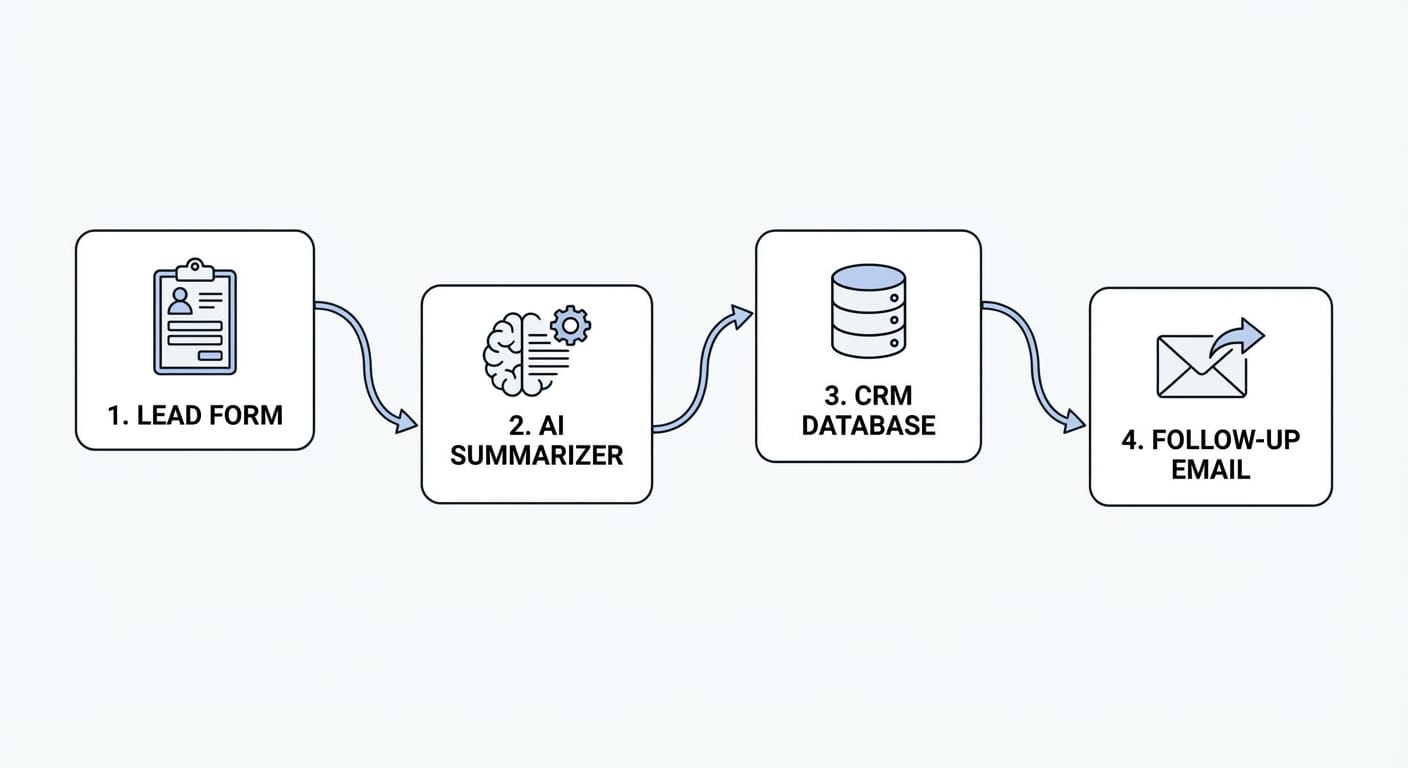
This is the underrated moneymaker. When AI is paired with automation, you get real leverage: lead comes in → AI qualifies it → drafts a reply → logs it in your CRM → schedules follow-up.
That’s not futuristic. That’s Tuesday.
6) Sales enablement: fewer “uhh let me get back to you” moments
AI can generate call summaries, pull out objections, draft follow-up emails, and even suggest next steps based on your sales playbook. The best reps I know aren’t using AI to “be clever.” They’re using it to be consistent.
Money angle: consistency closes deals. Inconsistency loses them quietly.
7) Build tiny internal tools without begging engineering
If you can describe a workflow, you can often prototype it with AI: a script to rename files, a tool to clean a CSV, a small dashboard, a FAQ bot trained on your docs. This is where time savings compound—especially in ops-heavy teams.
And if you’re a founder? This one’s personal. I’m biased. Shipping faster is basically my love language.
The Bottom Line (no fluff)
If AI saves you 5 hours/week and you reinvest even half of that into revenue-producing work (selling, shipping, marketing), it’s not “nice to have.” It’s a competitive advantage.
Stats Spotlight: why this is more than hype
- McKinsey estimates generative AI could add $2.6–$4.4 trillion annually to the global economy via productivity gains and other impact. Source
- A randomized controlled trial with consultants found access to generative AI improved performance, with large gains on writing and analysis tasks (and helped lower performers the most). Source (Harvard Business School working paper page)
- OpenAI notes ChatGPT is commonly used for drafting, summarizing, brainstorming, and coding—exactly the kinds of tasks that clog real workdays. Source
Common mistakes (a.k.a. how people waste AI)
- They ask vague questions. “Write me a marketing email” gets you oatmeal. “Write a 120-word reactivation email for lapsed users, friendly tone, include a single CTA, mention new feature X” gets you results.
- They don’t build a repeatable process. If you prompt from scratch every time, you’re leaving value on the table. Save templates.
- They trust outputs blindly. AI is a power tool. You still wear safety goggles: verify facts, numbers, legal claims, and anything customer-facing.
- They automate chaos. If your workflow is a mess, automating it just helps you create mess faster. Fix the workflow, then automate.
Pro Tips Box: my practical AI setup (steal this)
- Create 10 “power prompts” you reuse weekly (emails, summaries, meeting notes, proposals, social posts).
- Give AI your context: audience, tone, constraints, examples, and the “definition of done.”
- Use AI as a reviewer: “What’s unclear? What objections will a buyer have? Where am I hand-waving?”
- Start with one workflow: inbox triage, content drafts, or CRM follow-ups. Nail one, then expand.
FAQ
Will AI actually save me time, or just add another tool to babysit?
Both are possible. If you use AI for repeatable tasks (drafting, summarizing, first-pass analysis) and save prompts, it saves real time. If you treat it like a toy and constantly start from zero, it becomes “productivity theater.”
What if my work is specialized?
Even better. Specialized work usually has expensive bottlenecks: documentation, client communication, research, compliance checklists. AI helps around the edges so your brain stays on the high-value core.
Is it safe to paste customer data into AI tools?
Depends on the tool and your policies. Don’t paste sensitive or regulated data unless you’re using an approved setup (enterprise controls, data handling terms, etc.). When in doubt, redact.
What’s the quickest path to “make more money” with AI?
Use AI to increase throughput in revenue-adjacent work: sales follow-ups, outbound personalization, landing page testing, faster proposal creation, and customer retention messaging.
Closing: Action Challenge
Here’s what I want you to do today (not “someday”):
- Pick one annoying task you do at least 3x/week (email replies, meeting notes, lead follow-ups, content drafts).
- Write a simple prompt template for it.
- Run it for a week and track minutes saved.
If you don’t measure it, you’ll just feel busy and assume nothing changed. Measure it, reinvest the saved time into something that pays, and suddenly AI stops being hype and starts being profit.