AI-Generated Content: The Good, the Bad, and the “Wait… Did a Robot Write This?”
AI-generated content can save you hours—if you don’t let it publish junk at scale. Here’s a practical 5-step workflow to get speed, keep quality, and avoid hallucinated “facts.”

AI-generated content isn’t the future. It’s the present. And if you’re still treating it like a gimmick, you’re basically showing up to a Zoom call with dial-up internet.
Here’s the thing… the real question isn’t “Should I use AI to write?” It’s “How do I use AI without shipping bland, risky, or straight-up wrong content?” Because yes, AI can help you publish faster. It can also help you publish nonsense faster. Progress!
The real problem: content got cheaper (and trust got more expensive)
We’ve entered the era where producing words is basically free. That sounds great until you realize the internet is now filling up with:
- Samey blog posts that say a lot and mean nothing
- SEO pages that read like a toaster manual
- Hallucinated “facts” that were never true in any universe

OpenAI literally warns that models can hallucinate—confidently generating incorrect information (their word, not mine). That’s not a bug you can ignore; it’s a workflow problem you have to design around. Source: OpenAI documentation
And then there’s the search side. Google has been pretty consistent on one point: it cares about content quality, not whether a human or AI typed it. But it’s also clear that low-quality, mass-produced content is exactly what its ranking systems try to demote. Source: Google Search Central
So yeah: you can use AI. You just can’t use it lazily.
Solution: treat AI like a junior writer (fast, helpful, needs supervision)
Look, I’ll be honest… the best mental model I’ve found is this:
AI is like hiring an eager intern who can type 120 words per minute and has read the entire internet. They’ll draft five versions in an hour. They’ll also cite a study that doesn’t exist if you don’t check their work.
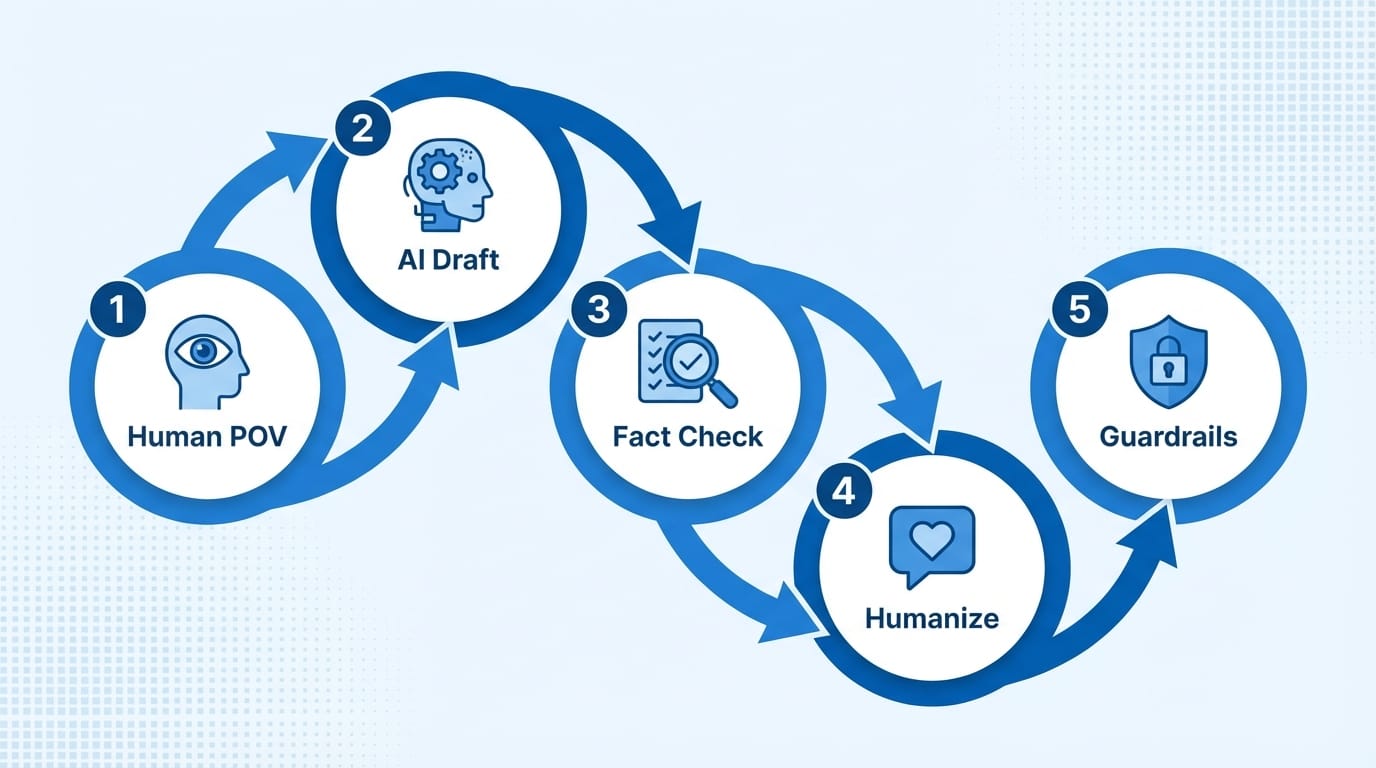
So let’s get practical. Here are 5 steps to use AI-generated content without tanking quality (or your reputation).
1) Start with a human POV (before you prompt anything)
Most people open ChatGPT and ask for “a blog post about X.” That’s how you get the same post everyone else got.

Instead, decide your angle first:
- What do you actually believe about the topic?
- Who is it for, specifically?
- What should they do differently after reading?
Then prompt AI with that context. You’re not ordering a burger—you’re briefing a writer.
2) Use AI for structure, drafts, and variants (not final truth)
AI shines at the stuff that slows humans down:
- Outlines and section ideas
- First drafts you can improve
- Alternative intros, titles, and CTAs
- Turning one idea into multiple formats (blog → email → LinkedIn)
But here’s what most people miss… AI is not a fact-checker. It’s a pattern generator. Treat “statistics,” “quotes,” and “studies” as guilty until proven innocent.
3) Bake in a fact-check step (yes, every time)
If your content includes claims that could be verified, verify them. Period.
Especially if you’re in health, finance, legal, cybersecurity—anything “Your Money or Your Life”-adjacent. Even outside those, readers are getting better at sniffing out BS. And once trust is gone, good luck winning it back.
Practical approach:
- Highlight every number, named study, and “according to…” line
- Replace weak citations with primary sources
- If you can’t verify, either remove it or label it as an estimate/opinion
4) Add the human layer: examples, scars, and specifics
Want your AI-assisted content to not feel like AI-assisted content?
Add what AI can’t: your experience and specificity.
- A quick story about a real customer problem
- A mistake you made (and what you learned)
- Your actual process, tools, numbers, templates
- Tradeoffs you’d only know from doing the work
Case study snippet (realistic example): A small SaaS team uses AI to draft 10 help-center articles. Before publishing, their support lead rewrites intros to match real ticket language, adds screenshots, and verifies every step in-product. Result: articles rank, tickets drop, and customers stop emailing “your docs feel… robotic.”
5) Put guardrails around brand + compliance
This is the unsexy part. It’s also where adults win.
Guardrails can be simple:
- A short brand voice doc (“we don’t sound corporate,” “we don’t dunk on competitors,” etc.)
- A banned-claims list (no medical promises, no made-up certifications)
- A mandatory review checklist before anything goes live
Also, be mindful of how platforms treat AI content. YouTube, for example, has been pushing for more disclosure around “synthetic” or altered media in certain contexts. Different channels, different rules—but the direction is obvious: transparency is becoming the norm. Source: YouTube Help – altered or synthetic content
Pro Tips Box: my favorite “don’t ship junk” moves
- Prompt for 3 outlines, pick the best, then draft—don’t accept the first answer.
- Force specificity: “Include 2 real examples, 1 counterargument, and a checklist.”
- Run a ‘so what?’ pass: after each section, add one line of advice.
- Make citations mandatory for stats—no source, no stat.
Common mistakes (aka how AI content goes off the rails)
- Publishing unedited drafts: congrats, you just blended into the content landfill.
- Letting AI invent sources: hallucinations happen, and they happen confidently.
- Optimizing for volume over usefulness: Google’s “helpful content” direction should scare you (in a healthy way).
- Forgetting tone: your brand voice is part of your product.
Checklist: a sane AI content workflow (5 steps)
- Human POV: pick angle, audience, and takeaway.
- AI Draft: outline + first draft + variants.
- Fact-check: verify every claim and replace weak citations.
- Humanization: add examples, specifics, and opinions.
- Final guardrails: brand voice + compliance + publish.
FAQ
Is AI-generated content bad for SEO?
Not automatically. Google’s stance is quality-first: helpful, reliable, people-first content can rank regardless of how it’s produced. The risk is publishing low-value, mass-produced pages. Source: Google Search Central Blog
Do I need to disclose AI-generated content?
Depends on the platform, audience expectations, and the type of content. For sensitive topics or synthetic media, disclosure is increasingly expected (and sometimes required). When in doubt, transparency beats surprises.
What’s the best use case for AI content?
Drafting, repurposing, outlining, and summarizing—anything where speed matters and you can layer in human judgment.
What’s the worst use case?
Anything requiring strict factual accuracy without a review step (medical/legal/financial advice), or anything where your brand voice is the entire point.
Action challenge
The bottom line is… you don’t need “better prompts.” You need a better process.
Try this today: take one piece of content you were going to write, use AI for the outline + first draft, then spend 20 minutes doing only these two things: (1) add one real example, (2) verify every factual claim. Ship that—and compare the quality to your usual output. Notice the difference?
Sources
- Google Search Central: Creating helpful, reliable, people-first content
- Google Search Central Blog: Google Search and AI-generated content
- OpenAI Docs: Model behavior and limitations (hallucinations)
- YouTube Help: Altered or synthetic content policy