When to Use AI Coding Agents (So You Don’t Ship a Snowstorm)
A practical, no-drama guide to using AI coding agents—when to use subagents, skills, and MCP, and how to avoid chaos when things get hectic.

Imagine this: it’s Saturday night, the winter storm’s cranking up across Pennsylvania and Delmarva, and your team’s Slack is basically a blizzard of “prod is weird” messages. Meanwhile, officials are literally telling people to stay off the roads (Pennsylvania’s rolling out Tier 4 vehicle restrictions starting 12:01 a.m. Sunday) because conditions are going from snow to ice to rain—the full chaos combo.[1][2] Now ask yourself: do you want your codebase to look like I‑95 in an ice storm?
That’s the vibe I’m trying to help you avoid with AI coding agents—subagents, skills, MCP, tool runners, whatever your platform calls them. These things can be absolute monsters (in a good way) for shipping software… or absolute monsters (in the “why is it deleting my repo?” way) if you use them at the wrong time.
The problem: we keep treating agents like autocomplete
Most devs start with AI like it’s a fancy spellchecker. “Generate a function.” “Write tests.” “Explain this error.” Cool. Helpful. But that’s not what coding agents are built for.

A coding agent is more like a junior engineer who can type at 200 WPM and never sleeps… but needs clear instructions, guardrails, and a grown-up in the room for anything dangerous. And when you add subagents, skills, and MCP (Model Context Protocol), you’re basically giving that junior engineer a company badge, a toolkit, and access to your internal systems.
So yeah—use them. I’m pro-agent. But use them like you’d drive in a declared emergency: slower, with rules, and only if you actually need to go somewhere.
The solution: use the right agent “mode” for the job
Here’s my simple mental model. There are 5 times you should reach for an AI coding agent, and each one maps to a different setup (single agent vs subagents vs skills vs MCP).
1) When you need a fast map of an unfamiliar codebase
If you just got pulled into a service you haven’t touched since 2022 (or ever), a coding agent can crawl the project and summarize the architecture: entry points, main flows, where config lives, and what to avoid touching.
Best setup: One agent + read-only tools (repo access, search, docs). No write access yet. Think “snow tires,” not “race mode.”
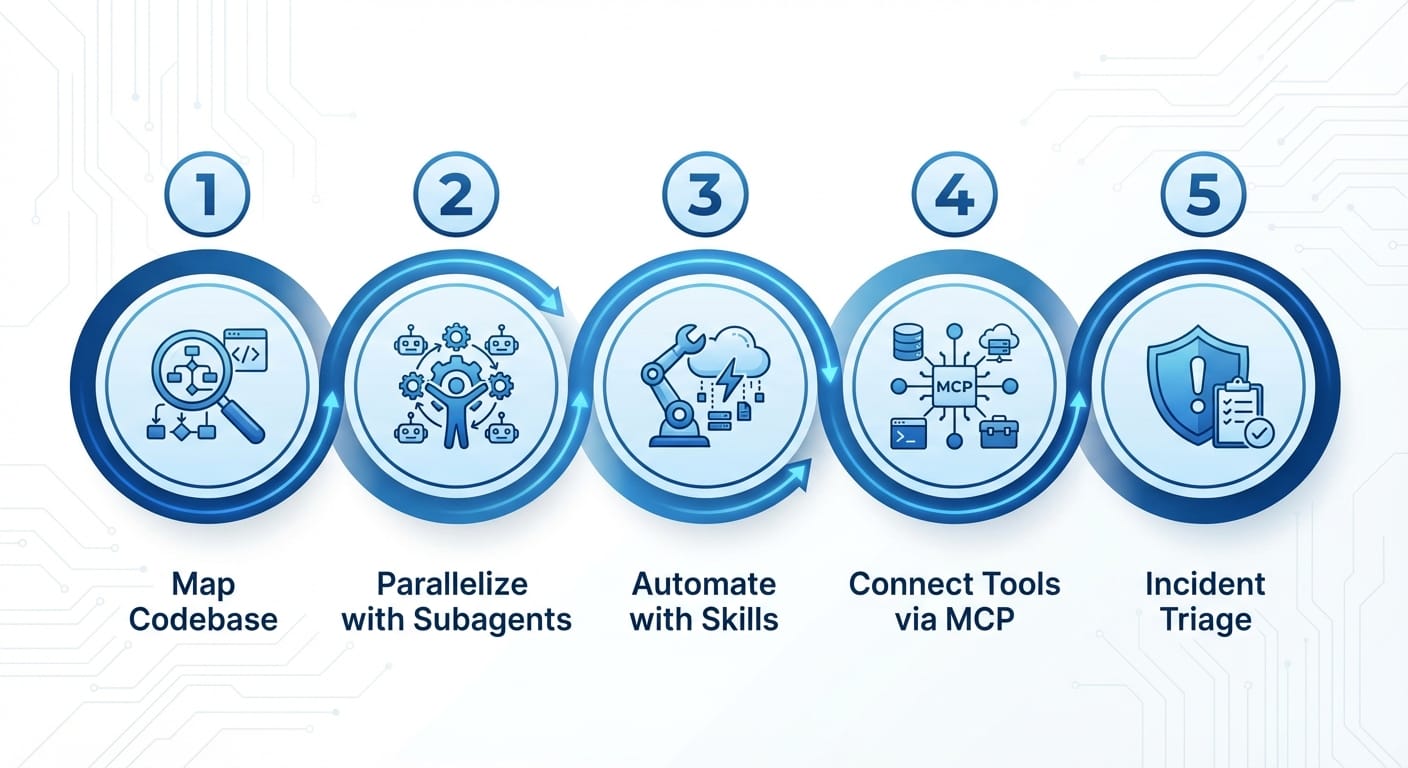
2) When the task is big enough to split into parallel workstreams
This is where subagents shine. You can delegate: one subagent drafts an implementation plan, another writes tests, another checks security implications, another updates docs. You get speed without one agent getting confused and hallucinating a solution.
Best setup: Coordinator agent + 2–4 subagents, each with a crisp role. If you can’t describe a subagent’s job in one sentence, you’re already overcomplicating it.
3) When you repeat the same “engineering chores” every week
This is where skills (reusable agent behaviors) pay off. Stuff like:
- “Create a PR checklist and apply it”
- “Generate tests that match our conventions”
- “Refactor this module but preserve public APIs”
- “Write release notes in our format”
Best setup: Skills library + policy. Skills should encode your team’s standards so you don’t re-teach the agent every sprint.
4) When the agent needs to touch real systems (safely)
This is MCP territory. MCP is basically a standardized way for models/agents to access tools and context (like repos, issue trackers, internal docs, CI logs) without you duct-taping a thousand integrations. It’s the difference between: “Here’s a pasted error log” and “Agent, read the last failed CI run, find the root cause, and propose the smallest fix.”
Best setup: MCP servers for specific systems (Git, CI, ticketing) with scoped permissions. Start read-only; graduate to write access when you trust your rails.
5) When everything’s on fire and you need controlled triage
Storm analogy time. This January 2026 storm has knocked out power for over 900,000 customers and canceled over 9,000 flights through Sunday.[3][9] When things are that chaotic, the worst move is freelancing. Same in incident response: you don’t want an agent “exploring fixes” on production like it’s sightseeing in an ice storm.
Best setup: One incident commander agent + strict runbooks as skills + tool access via MCP that’s limited to diagnostics. The agent suggests; humans push buttons.
Pro Tips (learned the hard way)
- Give agents “lanes,” not freedom. Define what they can read/write and where they’re allowed to operate.
- Make the agent show its work. Require citations to files, line numbers, and commands it ran.
- Use checklists like guardrails. If your team has a PR template, that’s a skill. Automate it.
- Prefer small PRs. Agents are best at “tight loops,” not 2,000-line mystery refactors.
Common mistakes (aka: how people end up in the ditch)
- Letting agents write to prod tools on day one. Start read-only. Earn trust. Same way states restrict travel in dangerous conditions.[1][9]
- No definition of done. “Fix performance” is vague. “Reduce p95 by 20% without changing behavior; add benchmark” is actionable.
- One mega-agent doing everything. If the problem has phases, use subagents or you’ll get a confused “wall of code.”
Case study snippet: the “Sunday storm deploy” (hypothetical, but painfully real)
Say you run a payments service. Storm hits, people panic-buy, traffic spikes, and your checkout latency climbs. (Grocery shelves empty, flights canceled, everyone stressed—sound familiar?[3][9])
You spin up:
- Subagent A: reads traces and finds top offenders
- Subagent B: checks recent merges and flags risky changes
- Subagent C: proposes a caching tweak + writes tests
Coordinator agent assembles a plan, but your human on-call approves the actual rollout. Outcome: faster diagnosis, safer execution.
FAQ
Do I need MCP to benefit from agents?
Nope. MCP helps when agents must access real systems reliably and repeatably. Start simple: repo + docs + local tooling.
How many subagents is too many?
Over 4–5, you’re basically managing a tiny company. If coordination overhead is higher than your time saved, dial it back.
What’s the first “skill” I should create?
Your PR checklist skill. It’s universal, boring, and high leverage—perfect for automation.
Action challenge
Today, pick one medium task you’d normally do manually—like adding tests, drafting a migration plan, or documenting a module—and run it with a two-agent setup: one agent proposes the plan, another reviews it like a cranky senior engineer. Then you do the final commit.
If a winter storm can force states to declare emergencies and restrict travel to keep people safe, you can definitely restrict your agents’ permissions to keep your code safe.[1][2][9] Same idea. Fewer ditches.
Sources
- [1] Pennsylvania disaster emergency proclamation and Tier 4 vehicle restriction details (Jan 23–25, 2026)
- [2] Delmarva snowfall shifting to ice/rain; Delaware emergency declaration (Jan 2026)
- [3] Reported power outages and flight cancellations connected to storm impacts (Jan 2026)
- [9] Ongoing disruptions, preparation guidance, and travel disruption context (Jan 24, 2026)